Bold Text Generator: Best Free Tools in 2026
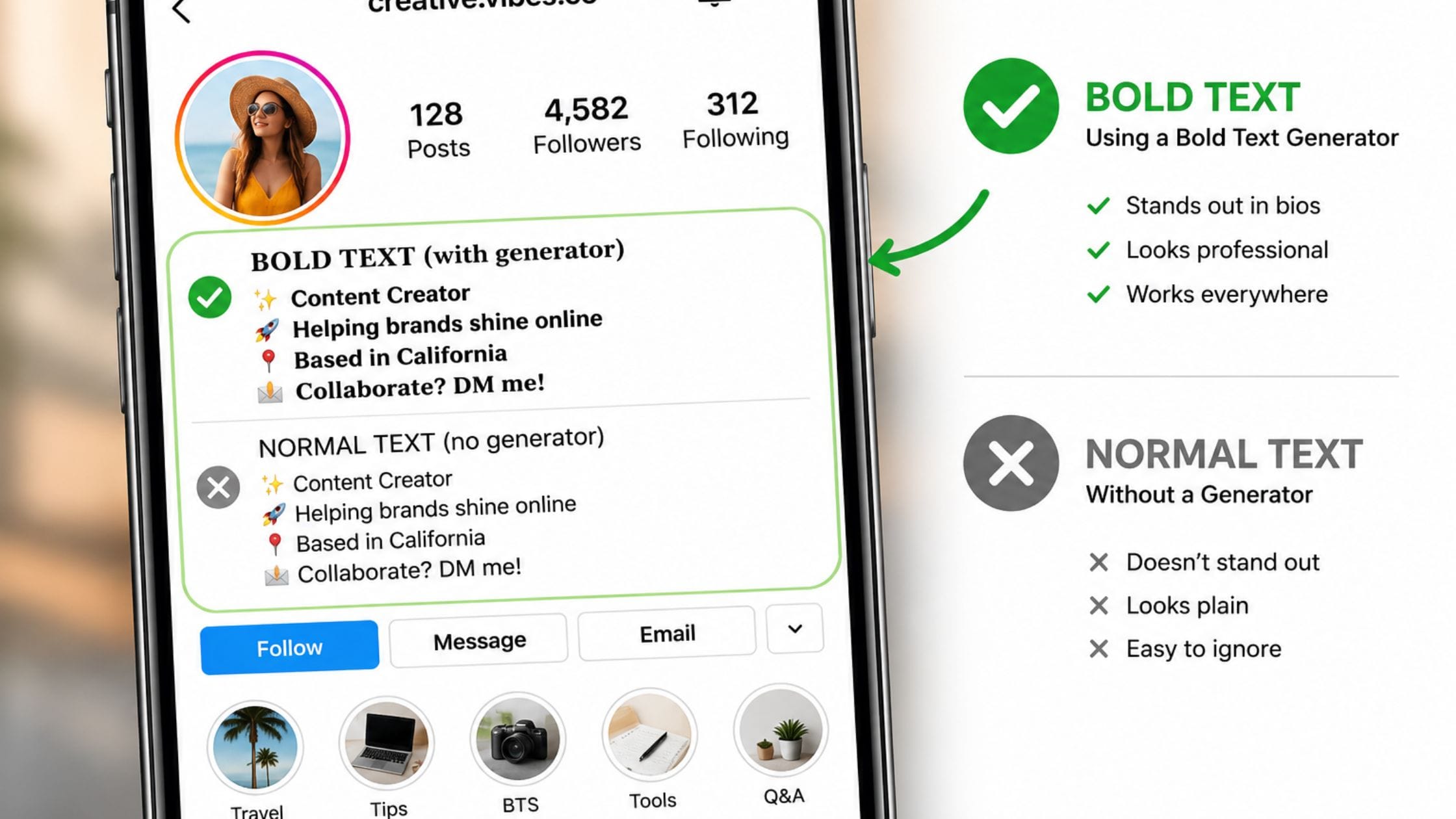
You know that noticeable text you see in bios and captions on some websites and apps where you cannot make text bold. This is not a way of formatting text. A tool that makes bold text works, by replacing letters with special characters that look bold. That is why the text still looks bold when you copy and paste it to a place that does not have a bold button. This guide will tell you how bold text really works. It will compare the free tools that can make bold text and explain when to use bold text and when it is better to use regular formatting.
How a Bold Text Generator Actually Works
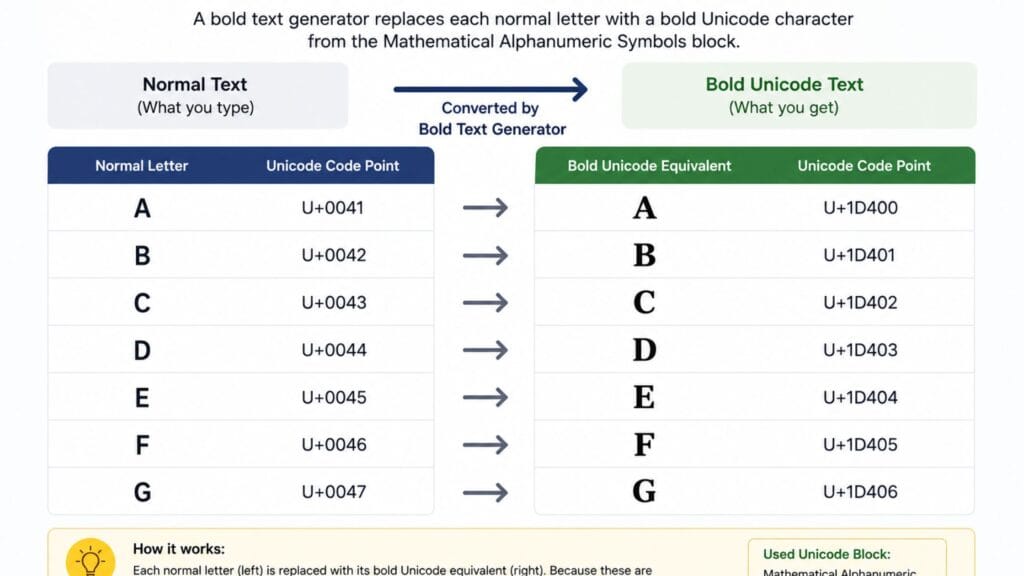
A bold text generator maps each regular letter to a separate character in Unicode’s Mathematical Alphanumeric Symbols block, a large range originally built for math and science notation rather than social media. The Unicode Consortium’s official code chart for that block lists more than a thousand code points covering bold, italic, script and several other styled alphabets, which is where every bold letter you see on a profile actually comes from.
Each bold letter is a character, not just a normal letter with some extra formatting. So when you copy and paste it it stays as text and still looks bold in any app that can show those special characters. This is also why you cannot just click a button to make the bold text normal again. The thing is, the text is not really bold because of some formatting it is just made up of characters altogether. The bold letters are special characters, like the regular ones but they look bold. This means that bold Unicode text is made up of these characters and that is why it stays bold when you copy and paste it.
Bold, Sans-Serif Bold and Bold Italic Explained
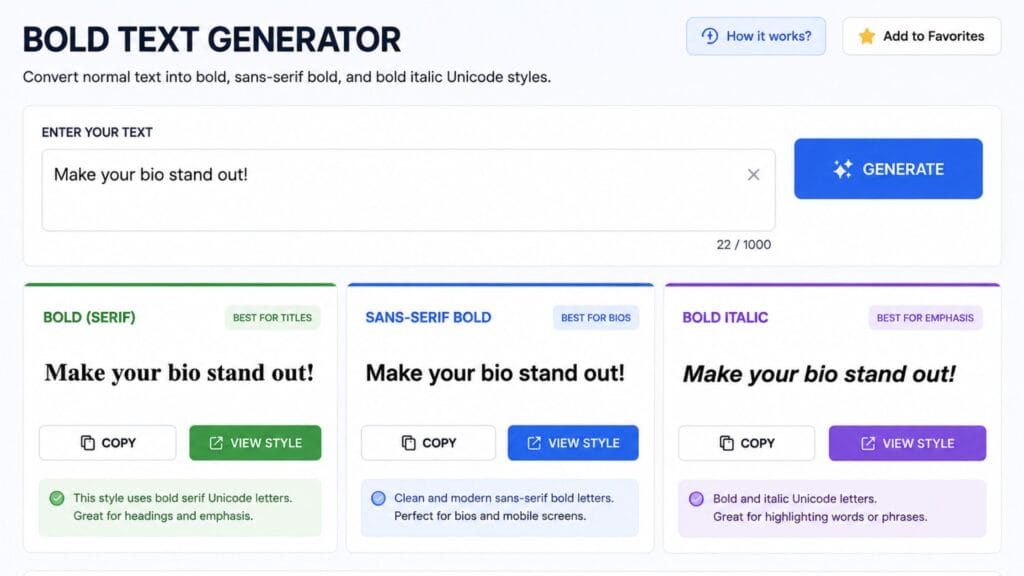
Standard bold Unicode text uses a serif-style bold alphabet, the kind with small decorative strokes at the ends of each letter, which tends to look closest to traditional bold print text. Sans-serif bold drops those decorative strokes for a cleaner, more modern look that many people find easier to read at small sizes on a phone screen.
Bold italic combines both effects into a slanted, heavy style that works well for a single word you want to emphasize without making an entire bio or caption feel too dense. Numbers only exist in some of these styles, so a phone number or a price written in a style without bold digits will show the surrounding letters styled while the numbers stay in their normal form.
How We Picked These Tools
This list favors tools that generate real Unicode characters rather than an image, since only genuine Unicode text reliably copies and pastes into bios, usernames and chat apps. Each entry was judged on how many bold styles it offers beyond a single default, how clearly it flags characters that will not convert, such as punctuation or accented letters and how quickly you can get from typing a word to copying a finished result.
Quick Comparison Table
| Tool Type | Styles Offered | Best For | Cost |
| Single-style bold generator | Bold serif only | Quick, simple emphasis | Free |
| Multi-style Unicode text tool | Bold, sans-serif bold, bold italic and more | Comparing several looks at once | Free |
| Bold and italic combo tool | Bold, italic, bold italic | Writing-focused styling like titles | Free |
| Full styled-text suite | Bold plus script, fraktur, double-struck and more | Building a distinctive profile | Free |
Best Bold Text Generators to Try
When you are trying to pick a style for your bio or username a tool that shows you bold sans-serif bold italic text all at the same time is really helpful. This way you can see what your text will look like before you decide on a style. Look for a tool that lets you see a preview of your text as you type so you do not have to start over every time you make a change.
If you just want to make one word or a heading look special a simple tool that does bold and italic is usually the choice. This is because it does not have all the styles that you do not need so it is faster to use. There are a lot of these tools available. They all pretty much do the same thing so it is more important to pick one that is easy to use and looks nice rather than worrying about which brand it is. You want to be able to try out styles, for your bio or username and see what they look like so a tool that is easy to use is really important.
For bold, high-contrast text with a specific viral aesthetic rather than a general Unicode style, BratGen’s Brat Font Text Generator takes a different approach entirely, rendering your text as a styled image with color and blur effects rather than swapping individual characters, which is worth knowing if you want a graphic rather than copy-paste text.
Where Bold Unicode Text Works Best
Bold text is most effective when it highlights a line a name or a short phrase against surrounding normal text the same way real bold formatting works in a document. A whole paragraph in Unicode text tends to feel harder to read rather than more impactful since the effect loses its contrast once everything around it is bold too.
It works well on platforms that offer no native formatting, at all such as most bio fields usernames and comment sections where it is often the only way to visually separate one line from another without switching to an image.
Limitations Worth Knowing Before You Use It
Bold Unicode characters usually only work with the alphabet and numbers. So things like punctuation letters with accents and scripts that’re not from Latin stay the same. They do not change into bold. For example a word with an accent or a special dash will look like it has both bold and normal characters mixed together. This can look weird if you are not used to it.
Screen readers and search engines do not always see these characters the way they see regular text. This is because they are actually symbols, not the same, as the letters they look like. So if you need to write something that everyone can read like a company name or important contact details it is better to use text or real formatting instead of using Unicode bold. This way you can be sure that everyone can see it and find it when they search for it.
How to Copy and Paste Bold Text Anywhere
1. Open a bold text generator and type or paste the word or phrase you want styled.
2. Compare the available styles if the tool offers more than one, since sans-serif bold and bold italic can look meaningfully different for the same word.
3. Click the copy button next to your preferred style or manually select and copy the result if no copy button is available.
4. Paste the text into your bio, caption, username or message using Ctrl+V on desktop or a long press and Paste on mobile.
5. Preview the result on the actual platform before using it somewhere permanent, since a small number of apps handle this Unicode range inconsistently.
Exploring the Rest of the Text-Styling Family
Bold text is one style in a bigger family of copy-paste Unicode text. If you want the opposite effect, something quieter and smaller, our small font generator guide covers small caps, superscript and subscript text in detail. For something more decorative, the cursive font generator guide covers script-style Unicode text and the strikethrough text generator guide covers crossing out text for jokes and corrections.
If bold text is just one piece of a bigger profile or content refresh, it is worth browsing the wider collection of free text and font generator tools on the same site rather than switching between several separate tools for each style.
FAQs
Is bold Unicode text an actual font?
No these are characters, from the Mathematical Alphanumeric Symbols block. They are not a font that you can apply to letters. That is why you can copy and paste Mathematical Alphanumeric Symbols into text boxes that do not have any formatting options. You can use Mathematical Alphanumeric Symbols in lots of places because they are just characters, not a special kind of formatting.
Why do some characters not turn bold when I use a bold text generator?
The Bold Unicode coverage is pretty basic. It usually only covers the Latin alphabet and digits. So when it comes to punctuation, accented letters and characters from -Latin scripts they mostly stay the same. This is not really a problem, with the tools we use. Rather a limit of the characters that Unicode has assigned to that particular block. The Bold Unicode coverage has this limit because of how Unicode assigned the characters in the place.
Does bold text work on every social media platform?
Bold Unicode text works on modern platforms like Instagram, X, Facebook, TikTok and Discord. This is because they all support Unicode rendering. You can usually use it without any problems. However some older systems or specific input fields may not display it correctly. So it is an idea to preview the Bold Unicode text before you use it somewhere permanent like, on a website or something. Bold Unicode text is pretty useful. You have to make sure it works everywhere you want to use it.
Can search engines read bold Unicode text?
Not reliably in the same way they read normal text, since these are technically different characters rather than styled versions of the letters they resemble. For anything that needs to be fully searchable, such as a business name, use normal text instead.
What is the difference between bold and sans-serif bold Unicode text?
The Unicode text that is in bold has some extra lines on it like the kind you see in old books. This is what makes it look fancy. Then there is the text, without these extra lines it looks very simple and modern. Both of these styles are perfectly fine to use so you just have to pick the Unicode text style that you think looks better.
Is it better to use a bold text generator or real bold formatting?
It depends entirely on the platform. Use real formatting, such as an HTML bold tag or a word processor’s bold button, wherever that option is available, since it is more accessible and more reliably searchable. Reach for a bold text generator specifically on platforms like bios and usernames that offer no formatting tools at all.
Conclusion
A bold text generator is really cool because it changes letters into special Unicode characters that look bold. This is why the bold effect still works on platforms that do not have their formatting tools.
The bold text generator works best on a line or a short phrase, not on a whole paragraph. It is also important to remember that these special characters are not as easy to access or search for as regular text is.
If this guide was helpful to you in finding the bold style for your text then you should share it with someone who is still typing their bio in plain text.. You can leave a comment and tell us about the platform where the bold text generator made a big difference, for you.