Cursive Font Generator: Best Free Script Text Tools 2026
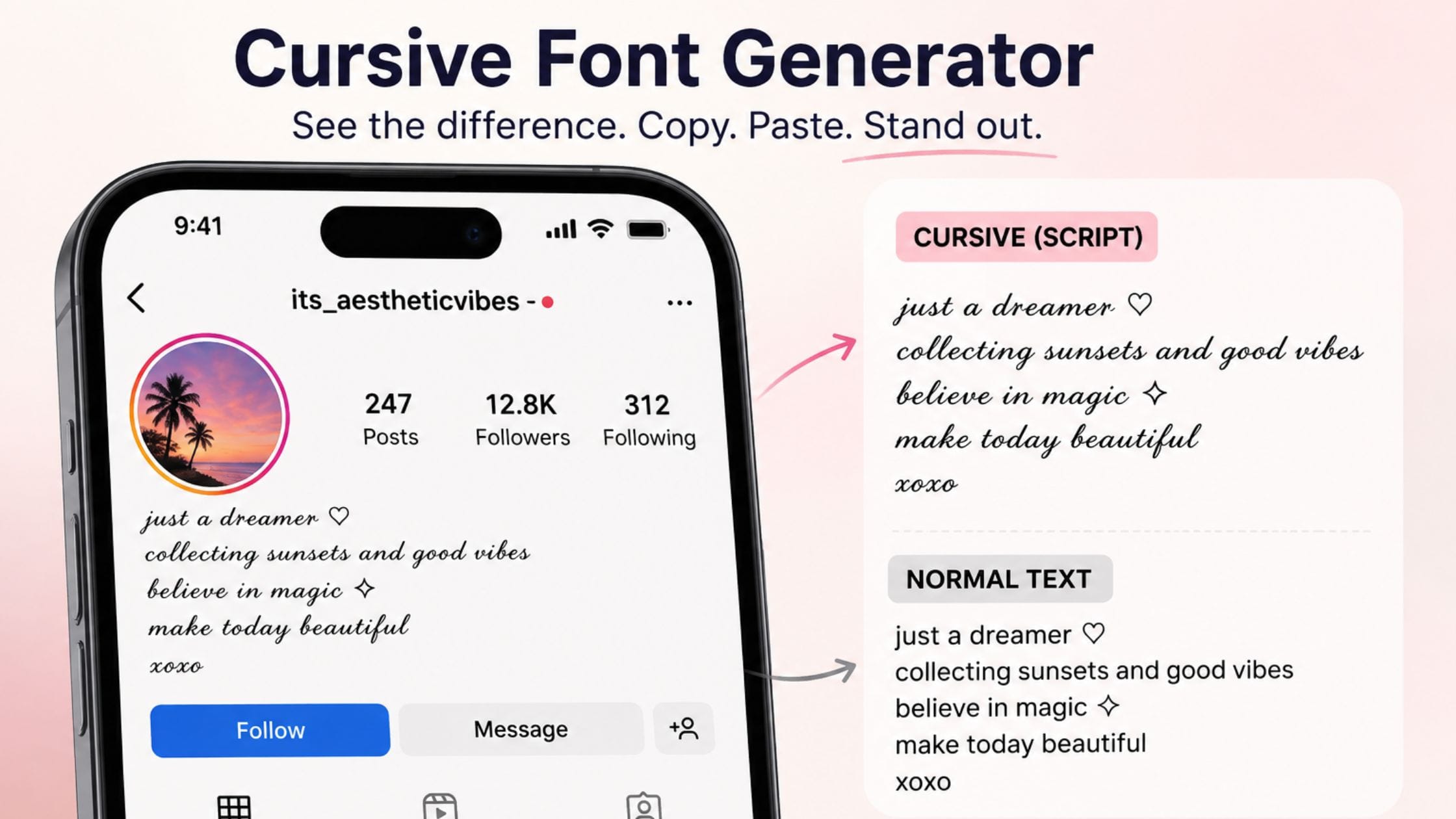
A cursive font generator works by replacing letters with real Unicode script characters that are already on most modern devices. This is why the beautiful flowing look stays the same when you copy and paste it anywhere. It works best with names, short quotes, and single lines with accents. It is important to remember that these characters are not as easy to access or search for normal text. The elegant flowing script you see in wedding hashtags, bios, and quote captions is not a font you download.
A cursive font generator works by replacing letters with another set of Unicode characters from the mathematical script alphabet. This is why the style works well when you copy and paste it into places that never have a script font option. This guide explains how cursive text really works, compares the free tools for creating it and looks at where it adds style and where it can cause problems with reading.
How a Cursive Font Generator Actually Works
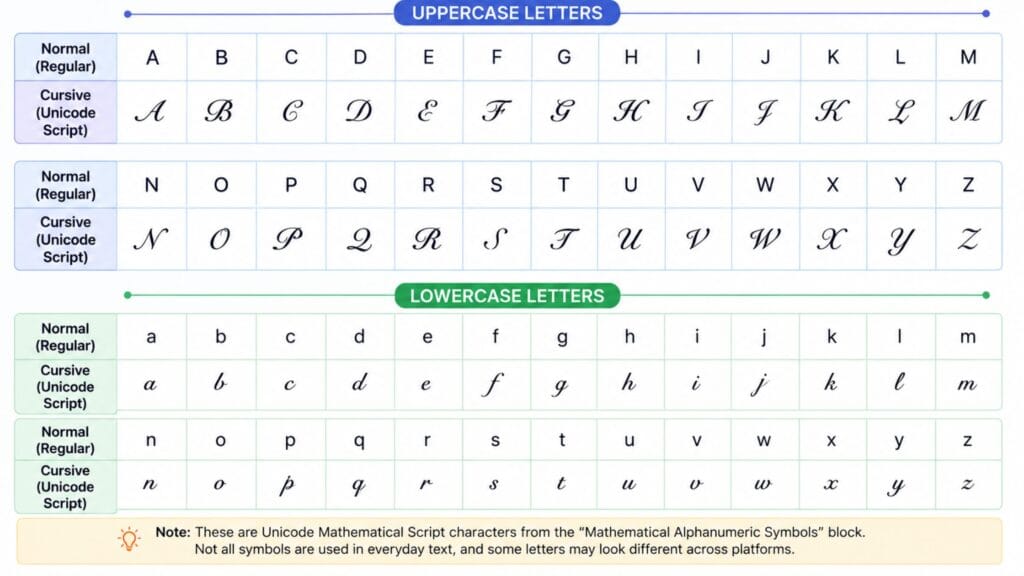
A cursive font generator maps each regular letter to a character in Unicode’s Mathematical Alphanumeric Symbols block, the same large range that also supplies bold and italic Unicode styles. The Unicode Consortium’s own code chart for that block includes a dedicated script and bold script alphabet originally meant to distinguish variables in mathematical notation and it is that flowing, handwritten-looking script alphabet that cursive text generators repurpose for social media styling.
Because the result is a genuine set of separate characters rather than a font file, it behaves exactly like normal text once copied, which is why it survives paste into bios, usernames and comment fields that have no way to change fonts at all. Nothing is being formatted here, only substituted, letter by letter, for a different character that happens to look like handwriting.
Script, Bold Script and Where the Gaps Are
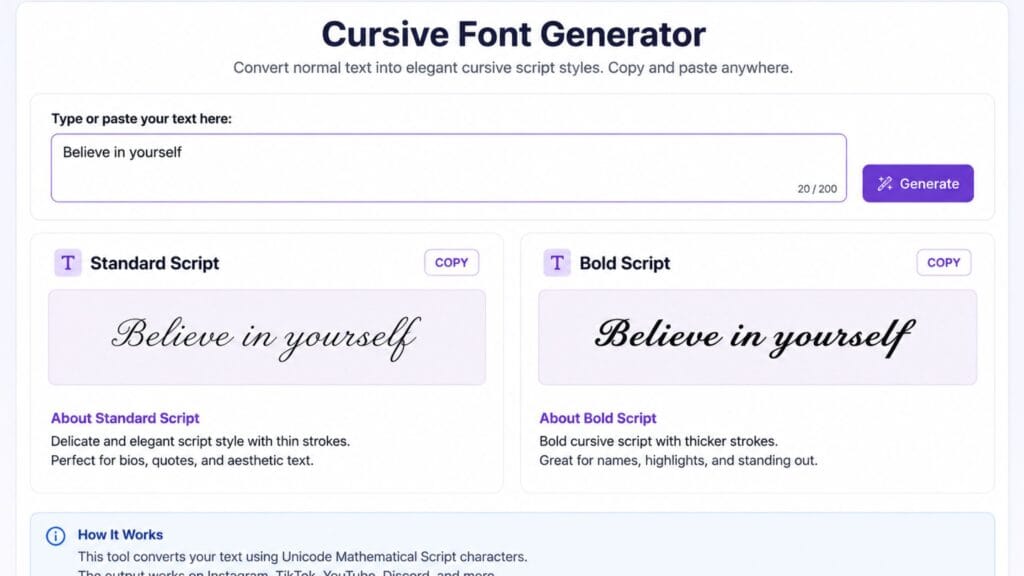
Standard script uses thin, delicate strokes that resemble a fine pen, which tends to read as more refined and formal, the kind of look people reach for on a wedding hashtag or an elegant quote. Bold script uses the same flowing letterforms with heavier, filled strokes, which reads as warmer and more visible at small sizes, particularly useful for a name or short phrase you want to stand out.
Neither alphabet is fully complete and the gaps differ between them. The regular script style is missing several uppercase letters entirely, so some tools convert only lowercase letters in that style and leave capitals unchanged. Bold script generally has a fuller set covering both cases, which is why it tends to be the more reliable choice when a name includes capital letters that need to stay in the same cursive style as the rest of the word.
How We Picked These Tools
This list favors tools that produce genuine Unicode script characters rather than an image, since only real Unicode text copies and pastes reliably across apps. Each entry was judged on whether it clearly distinguishes standard script from bold script, how it handles the missing uppercase letters in the regular style and how quickly you can move from typing a word to copying a finished result.
Quick Comparison Table
| Tool Type | Styles Offered | Best For | Cost |
| Single-style script generator | Standard script only | Quick, simple elegance | Free |
| Script and bold script tool | Script, bold script | Comparing weight and readability | Free |
| Multi-style Unicode text suite | Script plus bold, italic and more | Building a full aesthetic profile | Free |
| Decorative flourish generator | Script combined with symbols and borders | Standing out with a unique look | Free |
Best Cursive Font Generators to Try
A tool that shows script and bold script next to each other with a live preview as you type helps you easily see the difference in weight and how easy it is to read before you decide which one to use for a bio or a caption. Make sure to look for a tool that points out which uppercase letters will not change in the style so you are not caught off guard by a name that looks uneven later.
If you want text with symbols or little fancy decorations instead of just regular script, a special tool for decorative text usually gives more unique results than a regular Unicode converter but the downside is that it might look a bit less formal. Choose the tool that fits the situation: use bold script, for a name or a heading use decorative details for a more fun and lively profile.
If you are choosing a cursive style specifically to build out a username or gamer tag, our Brat Username Ideas guide covers naming strategy for TikTok, Instagram and gaming profiles, which pairs naturally with a script-styled name once you have settled on the wording.
Where Cursive Text Works Best
Cursive text works best for names, short quotes and single accent lines rather than long paragraphs, since flowing script letterforms are naturally harder to scan quickly at length than plain text is. A bio’s opening line, a signature under a caption or a wedding hashtag are all classic uses where the elegance of the style outweighs the small readability cost.
It also pairs well with a specific aesthetic, minimalist, romantic or vintage-leaning profiles, where the softness of script contrasts nicely with bold or blocky elements elsewhere on the same page.
Limitations Worth Knowing Before You Use It
Cursive Unicode characters generally cover only the standard Latin alphabet, so punctuation, accented letters and numbers usually stay in their normal form when converted, which can look inconsistent in a name with an accent mark. As noted above, the regular script style in particular is missing several uppercase letters, so always check a preview before pasting a name or word with capitals into that specific style.
Screen readers and search engines treat these characters as distinct symbols rather than the letters they visually resemble, so cursive Unicode text is not reliably accessible or searchable. Save it for decorative accents rather than anything that needs to be read aloud correctly or found through search.
How to Copy and Paste Cursive Text Anywhere
1. Open a cursive font generator and type or paste the word or phrase you want styled.
2. Compare standard script and bold script if the tool offers both, paying attention to how any capital letters render in each style.
3. Click the copy button next to your preferred style or manually select and copy the result if no copy button is available.
4. Paste the text into your bio, caption, username or message using Ctrl+V on desktop or a long press and Paste on mobile.
5. Preview the result on the actual platform before finalizing it somewhere permanent, since a small number of apps handle this Unicode range inconsistently.
Exploring the Rest of the Text-Styling Family
Cursive text is one style in a bigger family of copy-paste Unicode text. If you want something quieter, our small font generator guide covers small caps, superscript and subscript text. For maximum visual weight instead of elegance, the bold text generator guide covers bold Unicode styles and the strikethrough text generator guide covers crossing out text for jokes and corrections.
If cursive text is just one piece of a bigger profile refresh, it is worth browsing the wider collection of free text and font generator tools on the same site rather than switching between several separate tools for each style.
FAQs
Is cursive Unicode text an actual downloadable font?
No, it is a set of separate Unicode characters from the Mathematical Script alphabet rather than a font file. That is exactly why it can be copied and pasted into bios and usernames without ever installing anything.
Why do some capital letters not convert in standard cursive script?
The regular Unicode script alphabet is missing several uppercase letters, which Unicode never assigned distinct script variants for. Bold script generally has a more complete set covering both cases, so switching to that style usually fixes the issue for names with capital letters.
Does cursive text work on every social media platform?
Cursive Unicode text works on the large majority of modern platforms, including Instagram, TikTok, X, Discord and Facebook, since they all support standard Unicode rendering. A small number of older systems occasionally fail to display it correctly, so it is worth previewing before using it somewhere permanent.
Is cursive text accessible for screen readers?
Not reliably. Screen readers often read these characters as unusual symbols rather than as the letters they visually resemble, which can make cursive text confusing for visually impaired users. It works best as a decorative accent rather than for essential information.
What is the difference between cursive and bold script?
Standard cursive uses thin, delicate strokes that resemble a fine pen, while bold script uses the same flowing letterforms with heavier, filled strokes for more visibility and warmth. Bold script also tends to have a more complete alphabet, including more uppercase letters.
Can I use cursive text for a business or brand name?
It works well as a decorative accent for a tagline or a single styled word but relying on cursive Unicode text for a core brand name is risky since it is not reliably searchable and does not render identically everywhere. Use normal text for anything that needs to be found through search or read consistently across every platform.
Conclusion
A cursive font generator works by swapping ordinary letters for genuine Unicode script characters that already exist on virtually every modern device, which is exactly why the elegant, flowing look survives copy and paste anywhere. It is most effective on names, short quotes and single accent lines and it is worth remembering that these characters are not fully accessible or searchable the way normal text is.
If this guide helped you find the right script style, share it with someone still typing their bio in plain text or drop a comment with the platform where cursive text made the biggest difference for you.