Best AI Image Generators in 2026 (Free and Paid)
Stock photo sites still charge for the same handful of generic office and lifestyle shots everyone else is already using, which is exactly the gap AI image generators have spent the last two years closing with genuinely original output from a text prompt. What free actually gets you varies more between tools than most comparisons admit and at least one popular option has terms so disputed that even careful, recently published sources cannot agree on them. This guide compares the best AI image generators for 2026 and flags exactly where that disagreement sits.
Why Free Means Something Different for Every Tool Here
Every tool in this category calls part of itself free but that word covers a wide range of actual arrangements: a genuinely unlimited daily allowance, a small credit count that resets weekly or a free tier that generates images you are not actually allowed to use for anything commercial. Treating free as one category flattens differences that matter the moment you plan to publish or sell something made with the output.
This matters more in image generation than in most other AI categories, since the output itself is the deliverable rather than a draft you rewrite. A caption or a voiceover gets edited before it ships. An AI-generated image often gets used close to exactly as generated, which makes the licensing terms behind it a real, immediate concern rather than a footnote.
How This Comparison Was Built
This list favors tools with either a genuinely usable free tier or transparent, published pricing rather than a vague quote-on-request model. Each entry was judged on output quality for its stated strength, whether the free tier’s actual usage rights are clearly and consistently documented and how the tool fits into a real publishing workflow rather than a one-off novelty generation.
Quick Comparison Table
| Tool | Best For | Free Tier | Commercial Use on Free Tier |
| Midjourney | Highest artistic quality | No, none at all | Not applicable, paid only |
| Microsoft Copilot Image Creator | Unlimited casual free generation | Yes, no real daily cap | Yes, for normal use |
| Adobe Firefly | Copyright-safe commercial work | Yes, limited monthly credits | Yes, with indemnification on paid plans |
| Ideogram | Legible text inside images | Yes, small daily or weekly credits | Disputed, sources disagree, verify directly |
| Leonardo AI | Game assets and production volume | Yes, generous daily credits | Check current terms by plan |
| Stable Diffusion | Full customization, self-hosted | Yes, free with your own hardware | Generally yes under open-weight terms |
Midjourney: The Quality Leader With No Free Tier at All
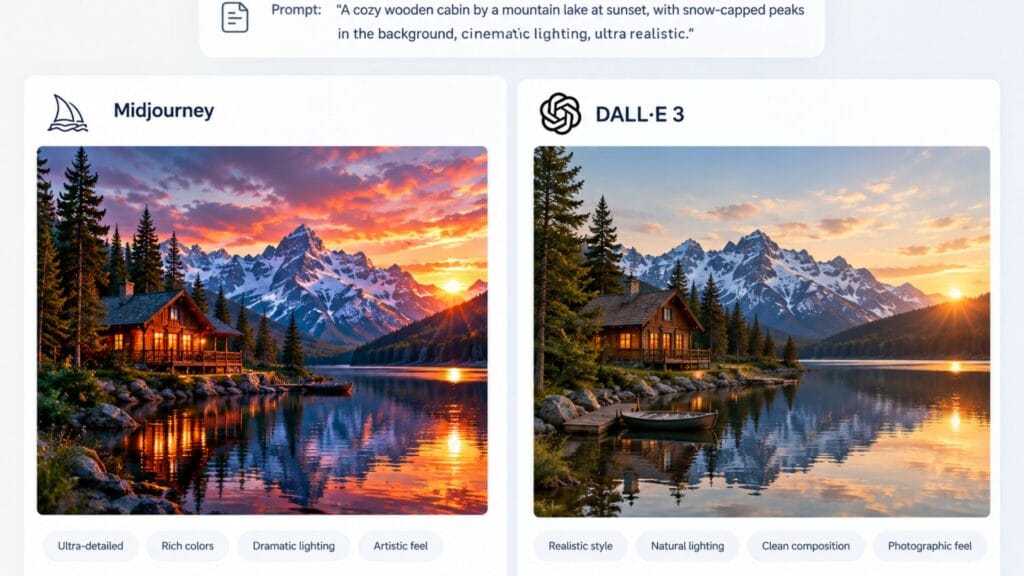
Midjourney remains the most consistently cited pick for artistic quality across nearly every comparison in this category, with a distinctive rendered style that other tools still get compared against rather than the reverse. It runs primarily through Discord, which gives it a genuinely different workflow than the web-based tools on this list, prompt, review and iterate inside a chat interface rather than a traditional editor.
The detail worth stating plainly: Midjourney has no free tier of any kind in 2026. Plans start around 10 dollars a month for Basic and every image you generate, even to test the tool, requires an active subscription. If a source describes trying Midjourney for free, that information is out of date.
Microsoft Copilot Image Creator: The Free Option Most People Miss
Built on the same underlying model family as DALL-E, Microsoft’s Copilot Image Creator offers effectively unlimited free generation with no meaningful daily cap for normal use, no subscription and no credit card required to start. For anyone who just wants strong, general-purpose image generation without committing to a paid tool, it is one of the most overlooked entries in this category specifically because it ships inside a product most people already associate with chat rather than image generation.
It will not match Midjourney’s distinctive artistic style or Ideogram’s text accuracy but for everyday content, illustrations, concepts and quick visual ideas, it covers a genuinely wide range of use cases at zero cost.
Adobe Firefly: Built Around Copyright Safety First
Adobe Firefly’s entire positioning centers on commercial safety rather than raw artistic output, trained specifically on licensed and public domain content so businesses can use generated images with meaningfully lower copyright risk than tools trained on broadly scraped data. Adobe’s own Firefly product page highlights this commercial-safe training as the tool’s core differentiator rather than a secondary feature and several independent comparisons specifically name Firefly as the only major generator offering full commercial copyright indemnification on its paid plans.
The free tier includes a limited number of monthly credits, enough to test quality and workflow fit before deciding whether the commercial-safety guarantee is worth paying for. For any business generating images that will represent a brand publicly, that guarantee is often worth more than a marginal quality difference against a competitor.
Ideogram: Strong at Text in Images, Disputed on Commercial Rights
Ideogram has carved out a specific, genuinely useful niche: rendering legible, correctly spelled text inside a generated image, a task that trips up Midjourney and DALL-E often enough that Ideogram gets recommended specifically for posters, ads and simple logos where the words actually need to be readable. Its free tier includes a small daily or weekly credit allowance depending on which source you check, enough for real testing rather than a token trial.
Here is where this article breaks from most comparisons rather than repeating them: sources disagree, directly and recently, on whether Ideogram’s free tier actually grants commercial usage rights. Some describe commercial use as allowed on every tier. Others describe free-tier output as personal and non-commercial only, with full commercial licensing reserved for paid plans. Rather than picking one claim to repeat, the honest answer is that this term has genuinely shifted or been described inconsistently enough that you should verify it directly on Ideogram’s own current terms before using free-tier output commercially, not take any single article’s word for it, including this one.
Leonardo AI: Generous Daily Credits for Production Work
Leonardo AI pairs a genuinely generous free daily credit allowance with access to multiple underlying models, which makes it a strong fit for game assets, character design and other production work that needs volume rather than a single polished hero image. Independent review scores for the tool consistently cite satisfaction with its free tier specifically as a standout strength relative to competitors.
It trades some of Midjourney’s distinctive artistic cohesion for that flexibility and volume, which suits iterative production work better than it suits a single, carefully art-directed image.
Stable Diffusion: Free Forever If You Have the Hardware
Stable Diffusion remains the most customizable option in this category by a wide margin, open-weight, self-hostable and compatible with a large ecosystem of fine-tuned models, LoRAs and ControlNet extensions that let you steer output in ways closed platforms simply do not expose. Running it locally costs nothing beyond the electricity and hardware you already own, provided that hardware includes a capable GPU.
For anyone without that hardware, hosted API access is available on a genuine pay-per-image basis rather than a subscription, which keeps casual or occasional use cheap even without self-hosting. Open-weight licensing generally permits commercial use, though the specific terms depend on which model version and fine-tune you are running, so checking the license attached to a specific checkpoint is still worth the two minutes it takes.
The One Question Worth Asking Before You Trust Any Free Tier
Across this entire category, the single most consequential question is not image quality, it is whether you are actually allowed to use free-tier output for anything beyond personal experimentation. That answer varies by tool, occasionally varies by who is describing it and changes often enough that a specific claim from six months ago is not a safe thing to build a client project on without a second check.
The practical habit worth adopting: before generating anything meant for publication, a product listing, an ad, a client deliverable, open the specific tool’s current terms of service directly rather than relying on a summary, including the summaries in this article. Terms in this category have changed enough in the past year that treating any single source as final is a genuine risk.
Prompt Quality Matters More Than Which AI Image Generator You Pick
A vague prompt produces a generic result on any AI image generator, regardless of how capable the underlying model is and the gap between a mediocre generation and a genuinely usable one usually comes down to specificity rather than tool choice. Naming a concrete subject, a specific style reference, a lighting condition and a composition detail consistently outperforms a short, abstract request across every tool covered in this comparison.
It is also worth generating several variations of the same prompt rather than accepting the first result, since even the strongest AI image generator produces meaningfully different output across attempts with identical wording. Most tools make regenerating cheap or free specifically because providers expect this kind of iteration, so treating the first output as a draft rather than a final answer tends to produce noticeably stronger results across the board.
Matching a Generator to What You Are Actually Making
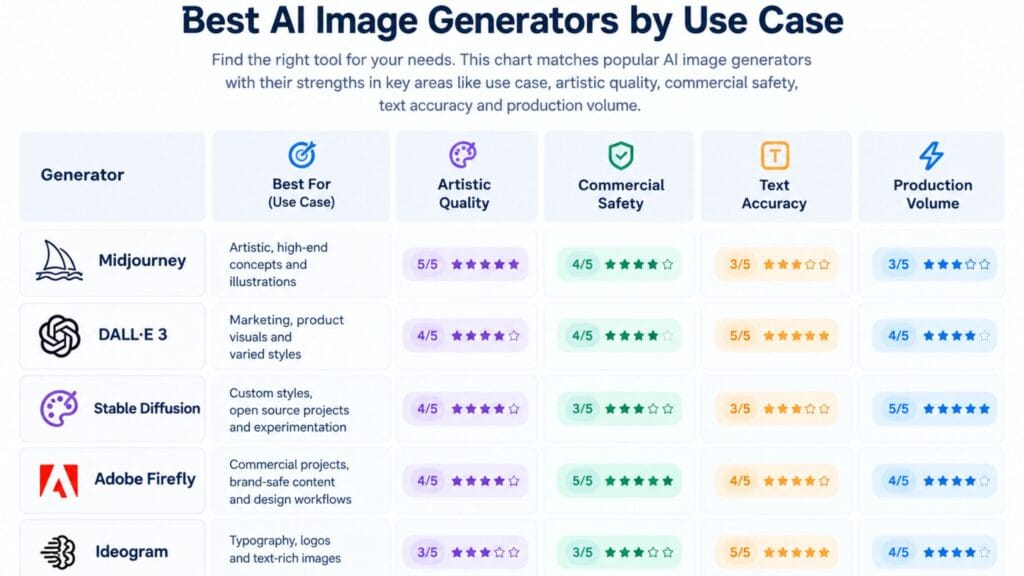
Choose Midjourney if artistic quality is the priority and you are ready to pay from the first image, since no free trial exists to test that quality first. Choose Microsoft Copilot Image Creator if you want strong, free, general-purpose generation with no subscription commitment at all.
Reach for Adobe Firefly specifically when commercial safety and copyright indemnification matter more than chasing the most striking visual style and choose Ideogram when legible in-image text is the actual requirement, while confirming its current commercial terms directly rather than assuming. Pick Leonardo AI for high-volume production work and Stable Diffusion if you have the hardware and want full control over the model itself.
Once you have a generated image, styling it into a finished graphic or thumbnail is the natural next step. Our guides to the best free design tools for non-designers and the YouTube thumbnail maker comparison cover exactly that and the free text and font tools on this site are worth a look for adding styled text on top of anything you generate.
FAQs
What is the best free AI image generator?
Microsoft Copilot Image Creator offers the most genuinely unlimited free generation with no subscription required, while Ideogram and Leonardo AI both offer usable daily credit allowances with different strengths, text accuracy and production volume respectively.
Does Midjourney have a free trial?
No, Midjourney has no free tier or trial in 2026. Every generation requires an active paid subscription starting around 10 dollars a month and any source describing a free way to try it is working from outdated information.
Can I use free AI-generated images commercially?
It depends entirely on the specific tool and terms vary enough between platforms and are described inconsistently enough by different sources, that verifying directly on the tool’s own current terms before commercial use is genuinely necessary rather than optional.
Which AI image generator is best for adding text to images?
Ideogram is the most consistently recommended option specifically for legible, correctly spelled text inside a generated image, a task that Midjourney and DALL-E handle less reliably. Confirm its current commercial licensing terms directly before using output for anything beyond personal use.
What is the best AI image generator for business use?
Adobe Firefly is the most consistently recommended option for commercial and brand work, since it is trained specifically on licensed content and offers copyright indemnification on paid plans, reducing legal risk compared to tools trained on broadly scraped data.
Is Stable Diffusion really free?
Yes, if you have a capable GPU to run it locally, since the model itself is open-weight with no subscription required. Without that hardware, hosted API access is billed per image rather than through a subscription, which still keeps occasional use inexpensive.
Conclusion
Image quality gets most of the attention in comparisons like this one but the detail that actually determines whether a free tier is usable for real work is licensing and this category has enough disagreement on that specific point that no single article, including this one, should be your last stop before publishing something commercially. Generate with whichever tool fits the job, then confirm the terms directly before the output leaves draft status.