Understanding Binary Numbers and the Role of a Binary Converter
Numbers are everywhere in modern technology, but computers do not process numbers in quite the same way people do. Behind applications, websites, digital devices, and electronic systems is a numerical language based largely on two values: 0 and 1. This is known as the binary number system.
For people who are more familiar with decimal numbers, reading a long sequence of binary digits can be confusing. This is where a Binary Converter can be useful. It provides a simple way to translate values between binary and other commonly used number systems while making technical calculations easier to understand.
A Quick Introduction to Binary
Binary is a positional number system with a base of two. Unlike the decimal system, which contains ten digits from 0 to 9, binary uses only 0 and 1.
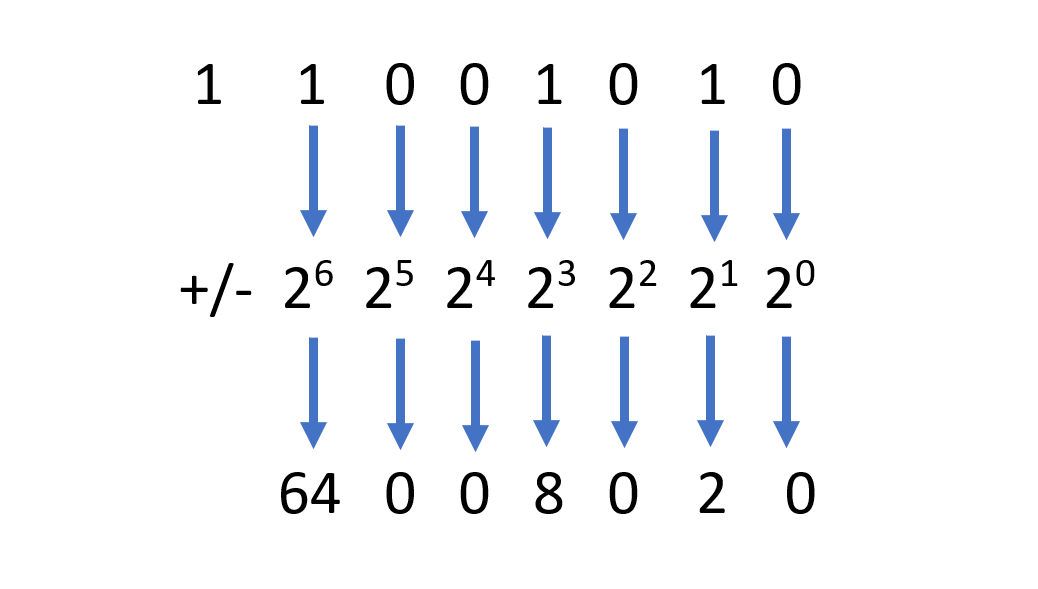
Each position in a binary number represents a different power of two. The position on the far right represents 2⁰, the next position represents 2¹, followed by 2², 2³, and continuing upward.
For example, take the binary value 100101.
Its decimal value can be calculated as:
1 × 32 + 0 × 16 + 0 × 8 + 1 × 4 + 0 × 2 + 1 × 1
The result is:
32 + 4 + 1 = 37
So, 100101 in binary equals 37 in decimal.
Once this positional system is understood, binary calculations become much less mysterious.
Why Computers Use Binary
Binary is closely connected to the way digital electronic systems operate. Electronic components can represent two distinct states, which can conveniently be represented as 0 and 1.
These two values form the foundation of digital information. Individual binary digits are called bits, and groups of bits are used to represent numbers, characters, instructions, and other forms of data.
For example, eight bits make up a byte. A byte can represent 256 different combinations, ranging from 00000000 to 11111111 when interpreted as an unsigned binary value.
This simple two-state system allows computers and other digital devices to store and process enormous amounts of information.
Binary Versus Decimal Numbers
The decimal system is the number system people normally use for everyday counting and calculations. It is based on powers of ten.
For example, the decimal number 572 can be broken down into:
5 × 100 + 7 × 10 + 2 × 1
Binary works according to the same general positional principle, but its base is two rather than ten.
For instance:
101₂ = 1 × 4 + 0 × 2 + 1 × 1 = 5₁₀
The main difference is the base. Once that difference is understood, converting between decimal and binary becomes a straightforward mathematical process.
Converting Binary to Decimal
One of the most common binary conversions is changing a binary number into its decimal equivalent.
Suppose you have:
101101₂
Write the powers of two beneath the digits:
32 16 8 4 2 1
Now multiply each digit by its corresponding value:
1×32 + 0×16 + 1×8 + 1×4 + 0×2 + 1×1
Adding the results gives:
32 + 8 + 4 + 1 = 45
Therefore:
101101₂ = 45₁₀
This process is useful for learning, but manually calculating longer binary values can take additional time.
Converting Decimal to Binary
The reverse conversion uses repeated division by two.
Imagine that you want to convert the decimal number 22 into binary. Divide the number by two and record the remainder at every step:
22 ÷ 2 gives a remainder of 0.
11 ÷ 2 gives a remainder of 1.
5 ÷ 2 gives a remainder of 1.
2 ÷ 2 gives a remainder of 0.
1 ÷ 2 gives a remainder of 1.
Reading the remainders from the bottom upward gives:
10110
Therefore, decimal 22 is equal to binary 10110.
This technique works well for small values, but a conversion tool becomes increasingly convenient as the numbers get larger.
The Connection Between Binary and Hexadecimal
Hexadecimal is another number system frequently encountered in computing. It uses sixteen symbols: 0 through 9 and A through F.
Binary and hexadecimal have a particularly useful relationship because one hexadecimal digit represents exactly four binary bits.
For example:
1111 = F
and:
1010 = A
Therefore, the binary value:
10101110
can be divided into two groups:
1010 1110
These groups correspond to A and E, giving the hexadecimal value:
AE
This makes hexadecimal a compact way of displaying information that would otherwise require a much longer sequence of binary digits.
How a Binary Converter Can Help
A conversion tool removes much of the repetitive arithmetic involved in changing values between different bases.
A Binary Converter can be useful for:
- Checking manually calculated answers
- Converting binary values into decimal
- Converting decimal numbers into binary
- Working with hexadecimal representations
- Understanding octal and other number systems
- Practicing computer science concepts
- Saving time when handling larger values
Students can use such tools as a verification method after completing calculations themselves, while programmers and technology enthusiasts may find them useful for quick numerical checks.
Binary in Programming and Technology
Binary concepts appear throughout computing. Bitwise operations, data representation, memory, digital logic, and computer architecture all rely on the principles of binary numbers.
Programmers may encounter binary values when working with flags or individual bits. Developers can also come across hexadecimal values because they provide a shorter representation of binary data.
Understanding these number systems can therefore make technical concepts easier to follow, especially for people beginning to explore programming or computer science.
Learn the Process, Then Use the Tool
Online conversion tools are convenient, but understanding how conversions work is still valuable. Knowing the underlying mathematics allows users to recognize whether a result makes sense and provides a stronger foundation for learning more advanced computing concepts.
A good approach is to solve simple examples manually and then compare the result with a converter. This combines practical understanding with the speed of an automated calculation.
Final Thoughts
Binary may look complicated at first because long strings of zeros and ones are unfamiliar to most people. In reality, the system follows a clear positional structure based on powers of two.
Once the basic principles are understood, converting between binary, decimal, hexadecimal, and other systems becomes much easier. A Binary Converter can further simplify the process by providing quick results and reducing the possibility of arithmetic mistakes.
For students, developers, and anyone interested in understanding how digital systems represent numbers, learning binary is a useful step toward understanding the technology behind modern computing. Tools such as BinaryCon can make these conversions faster while allowing users to focus more on understanding the concepts behind the numbers.