
Strikethrough Text Generator: Best Free Tools in 2026
Crossing out a word without deleting it is one of the oldest tricks in writing, used for corrections, second thoughts and the occasional joke where the crossed-out version is the real punchline. A strikethrough text generator brings that same effect to plain text fields that offer no formatting button at all, using a Unicode trick rather than an image or HTML tag. This guide explains how strikethrough text actually works, compares the best free tools for making it and covers exactly where it works reliably and where it can fall apart.
How a Strikethrough Text Generator Actually Works
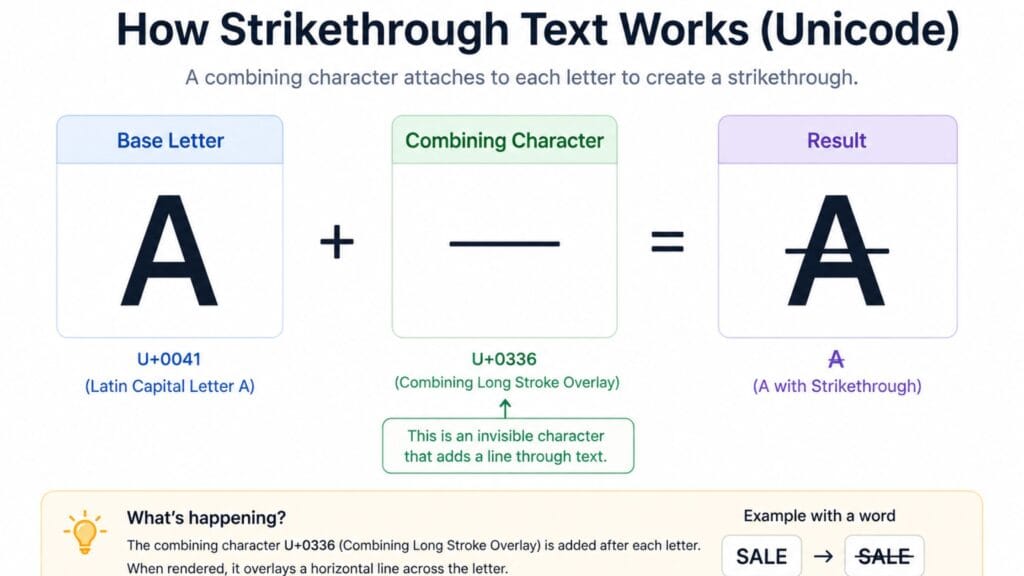
A strikethrough text generator works differently from bold, cursive or small text tools, since there is no separate strikethrough alphabet in Unicode. Instead it uses a combining character, most commonly U+0336, that attaches a horizontal line to whatever letter comes before it. The Unicode Consortium’s own chart for the Combining Diacritical Marks block documents this character alongside dozens of other marks originally designed to modify letters for accents and technical notation, not for social media styling.
The tool inserts that combining character after every single letter in your text, so a five-letter word actually becomes ten characters once you count the invisible strike marks attached to each one. The result displays as a continuous line running through the whole word but it is technically built from pairs of characters rather than a single strikethrough alphabet the way bold or cursive text is.
Strikethrough vs HTML and Markdown Formatting
Word processors and many websites offer real strikethrough formatting through HTML tags like <s> or <del> or through Markdown syntax like double tildes. Those approaches only work inside the specific rich text editor or platform that supports them and the formatting instruction is stripped the moment you paste the text somewhere plain, like a text message or a bio field.
Unicode strikethrough sidesteps that problem entirely, since the line is embedded in the character data itself rather than applied as a separate formatting layer. This is exactly why it survives copy and paste into places like Instagram bios, Discord messages and SMS texts that have no strikethrough button of their own, at the cost of being slightly less standardized in how different fonts render the line’s thickness and position.
How We Picked These Tools
This list favors tools that clearly explain which combining character they use and why, since a few different Unicode marks can produce a similar crossed-out effect with slightly different visual results. Each entry was judged on how consistently it renders across common platforms, whether it warns about apps like Discord and Slack that have their own native strikethrough shortcuts instead and how fast the copy-paste process is.
Quick Comparison Table
| Style | Combining Character | Visual Effect | Best For |
| Long stroke overlay | U+0336 | Continuous horizontal line | General crossed-out text |
| Short stroke overlay | U+0335 | Lighter, shorter dashes | Subtler strike effect |
| Long solidus overlay | U+0338 | Diagonal slash through letters | Stylized or dramatic effect |
| Combined with underline | U+0336 plus U+0332 | Struck through and underlined | Emphasis on a correction |
Best Strikethrough Text Generators to Try
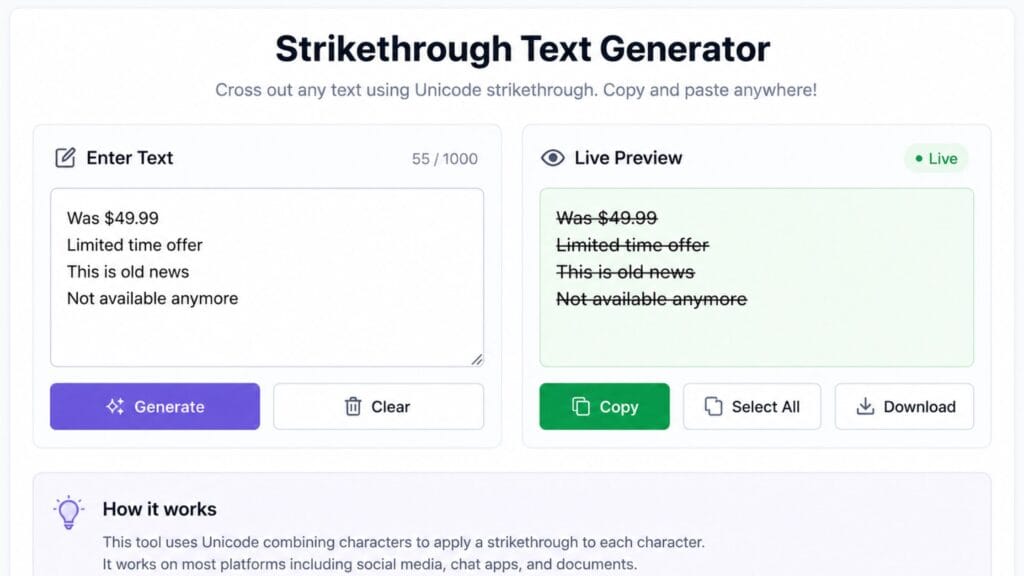
A dedicated strikethrough generator that shows a live preview as you type is the fastest way to check that your specific word or phrase renders cleanly before you paste it anywhere. Favor a tool that explicitly names which combining character it uses, since that detail affects how thick and continuous the line looks once pasted into a given app’s font.
For platforms with their own built-in strikethrough shortcut, such as Discord’s double tilde wrapper or Slack’s single tilde command, use that native option instead of a Unicode generator, since it renders more consistently within that specific app and does not carry the extra hidden characters a combining mark adds.
If crossed-out text is only one part of a broader meme or caption you are building, BratGen’s Brat Text Generator already includes a built-in crossed-out text option alongside blurred and mirrored text styles, which saves a step if you are working on a meme or caption rather than a plain bio line.
Where Strikethrough Text Works Best
Strikethrough text is most effective for showing a correction, an outdated price or a joke where the crossed-out version sets up the punchline that follows it, the classic before-and-after format used constantly in social captions. It works well precisely because the reader can still see what was crossed out, which is the whole point of the format compared to simply deleting the original text.
It also fits naturally into to-do lists and casual notes shared in plain text apps, marking a task as done while keeping a visible record of what was completed rather than removing the line entirely.
Limitations Worth Knowing Before You Use It
Because Unicode strikethrough adds a combining character after every single letter, longer sentences generate a large number of extra characters, which can hit character limits faster than the visible text length suggests. A caption that looks like fifty characters might actually count closer to a hundred once every combining mark is included.
Rendering also varies slightly between fonts and platforms, since each app decides how to position and size the combining mark relative to the letter it follows. Most modern apps handle this cleanly but very old software or plain text editors with limited Unicode support may show the strike mark as a separate box instead of a clean line through the letter.
How to Copy and Paste Strikethrough Text Anywhere
1. Open a strikethrough text generator and type or paste the word or phrase you want crossed out.
2. Check the live preview to confirm the line renders cleanly through every letter, especially for longer words.
3. Click the copy button next to the result or manually select and copy the text if no copy button is available.
4. Paste the text into your bio, caption or message using Ctrl+V on desktop or a long press and Paste on mobile.
5. On platforms like Discord or Slack that support their own strikethrough shortcut, consider using that native option instead for cleaner, more consistent rendering.
Exploring the Rest of the Text-Styling Family
Strikethrough is one style in a bigger family of copy-paste Unicode text. If you want something quieter, our small font generator guide covers small caps, superscript and subscript text. For maximum visual weight, the bold text generator guide covers bold Unicode styles and for something more decorative, the cursive font generator guide covers elegant script text.
If strikethrough is just one piece of a bigger caption or profile refresh, it is worth browsing the wider collection of free text and font generator tools on the same site rather than switching between several separate tools for each style.
FAQs
Is strikethrough text a real font or formatting?
No, it is built from a Unicode combining character attached to each letter rather than a font or a formatting instruction like HTML’s strikethrough tag. That is exactly why it survives copy and paste into plain text fields that offer no formatting tools at all.
Why does strikethrough text sometimes look inconsistent between apps?
Different apps and fonts render the combining character’s line thickness and position slightly differently, since Unicode defines the character but not exactly how every font should draw it. Most modern apps handle this cleanly, though very old software occasionally shows the mark as a separate box instead of a clean line.
Does strikethrough text count as more characters on platforms with a limit?
Yes, since a combining character is added after every single letter, a word that looks like five characters actually uses ten or more once the combining marks are counted. This can matter on platforms with strict character limits for bios or posts.
Should I use a strikethrough generator or my app’s built-in strikethrough shortcut?
Use your app’s native shortcut when one exists, such as Discord’s double tilde or Slack’s single tilde command, since it renders more consistently within that specific platform. Reach for a Unicode strikethrough generator specifically for platforms that offer no built-in formatting option at all.
Can I combine strikethrough with other text styles like bold or cursive?
Yes, since the strikethrough combining character can attach to bold or cursive Unicode letters just as easily as normal ones, though the more Unicode characters stacked together, the more likely a given platform is to render something imperfectly. Test any combined style on the actual platform before relying on it somewhere important.
Is strikethrough text accessible for screen readers?
Not reliably, since screen readers may announce the combining character separately or skip it entirely rather than reading the crossed-out effect the way a sighted user perceives it. Use it as a stylistic or comedic touch rather than for information that must be read aloud accurately.
Conclusion
A strikethrough text generator works by attaching a Unicode combining character to every letter rather than using a separate strikethrough alphabet, which is exactly why the effect survives on platforms with no formatting tools of their own. It is most reliable for short corrections, jokes and to-do items and it is worth remembering that it adds real hidden characters that can matter on platforms with strict length limits.
This wraps up our four-part guide to copy-paste text styling. If you found the right crossed-out look here, explore the small font, bold text and cursive font guides for the rest of the family or drop a comment with the style you use most across your profiles.