Right Triangle Calculator for Beginners: Everything You Need to Know
Understanding geometry becomes much easier when you know how to calculate the sides, angles, and area of a triangle. One of the most useful shapes in mathematics is the right triangle, which appears in school problems, construction projects, engineering, architecture, and everyday measurements. Although its calculations may seem complicated at first, a few basic formulas can help you solve most right-triangle problems with confidence.
A right triangle calculator makes these calculations faster and more convenient. Instead of working through every formula manually, you can enter the measurements you already know and find the missing values in seconds. Whether you are a student learning geometry for the first time or someone who needs quick measurements for a practical project, understanding how this tool works can save time and reduce calculation errors.
In this beginner-friendly guide, we will explain what a right triangle is, how its formulas work, how to use a calculator, and when these calculations are useful in real life.
What Is a Right Triangle?
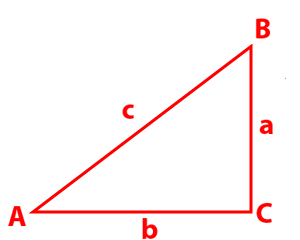
A right triangle is a triangle that contains one angle measuring exactly 90 degrees. This angle is called the right angle. The other two angles are always acute angles, meaning each measures less than 90 degrees.
A right triangle has three sides:
- Base: One of the two sides that form the right angle.
- Height: The other side that forms the right angle.
- Hypotenuse: The longest side, located directly opposite the right angle.
The base and height are perpendicular to each other, making them useful for calculating the triangle’s area. The hypotenuse is particularly important when finding the distance between two points or determining the length of a diagonal.
Understanding these three sides is the first step toward solving right-triangle problems.
What Is a Right Triangle Calculator?
A right triangle calculator is an online mathematical tool that helps you determine unknown measurements in a right triangle. Depending on the information you provide, it can calculate missing side lengths, angles, area, and sometimes the perimeter.
For example, if you know the lengths of the base and height, the calculator can determine the hypotenuse using the Pythagorean theorem. If you know one side and an acute angle, it can use trigonometric functions to calculate the remaining measurements.
Using a right triangle calculator is especially helpful for beginners because it reduces repetitive arithmetic and allows you to focus on understanding the mathematical relationships involved.
Most calculators require at least two suitable measurements, such as two sides or one side and one acute angle. The exact input requirements depend on the calculator and the measurements you want to find.
Understanding the Pythagorean Theorem
The Pythagorean theorem is one of the most important formulas in right-triangle geometry. It explains the relationship between the lengths of the three sides.
The formula is:
a² + b² = c²
In this equation:
- a represents one leg of the triangle.
- b represents the other leg.
- c represents the hypotenuse.
The theorem states that the square of the hypotenuse equals the sum of the squares of the other two sides.
Example: Finding the Hypotenuse
Suppose a right triangle has a base of 3 units and a height of 4 units. You want to calculate the hypotenuse.
Using the Pythagorean theorem:
c² = 3² + 4²
c² = 9 + 16
c² = 25
Taking the square root gives:
c = √25 = 5
Therefore, the hypotenuse is 5 units.
This is a classic example of a 3-4-5 right triangle. You can use the same method for many other combinations of side lengths.
If the hypotenuse and one leg are known instead, rearrange the formula:
a = √(c² − b²)
This allows you to calculate a missing leg as long as the hypotenuse is longer than the known leg.
How to Calculate Right Triangle Angles
The three interior angles of any triangle add up to 180 degrees. Since a right triangle has one angle of 90 degrees, its other two angles must add up to 90 degrees.
If one acute angle measures 35 degrees, the other measures:
90° − 35° = 55°
However, when you know the side lengths instead of an angle, trigonometry can help you find the missing angles.
Three common trigonometric functions are sine, cosine, and tangent.
Sine:
sin(θ) = opposite ÷ hypotenuse
Cosine:
cos(θ) = adjacent ÷ hypotenuse
Tangent:
tan(θ) = opposite ÷ adjacent
Here, θ represents the angle you are measuring. The opposite side is across from that angle, while the adjacent side touches the angle and is not the hypotenuse.
For example, if the opposite side is 3 units and the adjacent side is 4 units, you can calculate the angle using:
θ = tan⁻¹(3 ÷ 4)
The angle is approximately 36.87 degrees.
A right triangle calculator can perform these trigonometric calculations automatically, making it easier to find unknown angles and sides.
How to Use a Right Triangle Calculator Step by Step
Using a calculator is simple when you know which measurements to enter. Follow these steps to get accurate results.
Step 1: Identify the Measurements You Know
Begin by reviewing the problem and identifying the available information. You might know two side lengths, one side and an acute angle, or the hypotenuse and one leg.
Make sure you understand which side is the base, which is the height, and which is the hypotenuse.
Step 2: Enter the Known Values
Open the calculator and enter the measurements into the appropriate fields. Some tools allow you to select the known sides or angles before calculating.
Use the same unit for all side lengths. For example, enter all measurements in centimeters rather than mixing centimeters and meters.
Step 3: Calculate the Missing Values
Select the calculate option. The tool will apply the appropriate mathematical formulas to determine the unknown measurements.
Depending on its features, it may display all three sides, the two acute angles, the area, and the perimeter.
Step 4: Review the Results
Check whether the answers make sense. The hypotenuse should always be longer than either leg, and the two acute angles should add up to 90 degrees.
If the result seems incorrect, check the entered values, side labels, units, and angle settings.
Step 5: Practice the Formula Manually
Even when using an online calculator, try solving a few examples yourself. Understanding the formulas helps you recognize mistakes and apply the same methods to new problems.
Calculating the Area and Perimeter
Besides side lengths and angles, a right triangle calculator can help determine the area and perimeter.
Area of a Right Triangle
The area formula is:
Area = ½ × base × height
For a triangle with a base of 6 cm and a height of 8 cm:
Area = ½ × 6 × 8
Area = 24 cm²
The area is 24 square centimeters.
Remember that area is measured in square units, such as cm², m², or ft².
Perimeter of a Right Triangle
The perimeter is the total distance around the triangle. Add all three side lengths to calculate it.
Perimeter = a + b + c
For a triangle with sides of 3 cm, 4 cm, and 5 cm:
Perimeter = 3 + 4 + 5 = 12 cm
The perimeter is 12 centimeters.
These formulas are useful for calculating material requirements, measuring triangular spaces, and solving geometry exercises.
Real-Life Applications of Right Triangle Calculations
Right triangles are more than a topic in school mathematics. They are used in many practical situations.
Construction and carpentry: Builders use right-triangle calculations to check square corners, measure roof slopes, and determine diagonal distances.
Architecture and design: Architects use triangle measurements when planning ramps, staircases, roof structures, and other angled features.
Navigation and surveying: Surveyors can use right-triangle relationships to estimate distances and calculate differences in elevation.
Education: Students use these formulas to solve geometry problems, understand trigonometry, and prepare for examinations.
DIY projects: Homeowners may use right-triangle calculations when installing shelves, measuring ladders, designing garden layouts, or checking whether two sides meet at a right angle.
In these situations, accurate measurements are essential, and a calculator can make the work quicker and easier.
Common Mistakes Beginners Should Avoid
Although right-triangle calculations are straightforward once you understand the formulas, beginners sometimes make avoidable errors.
One common mistake is confusing a leg with the hypotenuse. Remember that the hypotenuse is always opposite the 90-degree angle.
Another mistake is using inconsistent units. Convert all lengths to the same unit before calculating.
When using trigonometry, make sure your calculator is set to degrees if your problem uses degrees. A calculator set to radians may produce a different numerical result.
You should also avoid rounding too early. Keep a few extra decimal places during intermediate calculations and round the final answer to the precision required by the problem.
Finally, check whether the given measurements are mathematically possible. The hypotenuse must be longer than either leg, and the side lengths must satisfy the Pythagorean theorem.
Conclusion
A right triangle calculator is a valuable tool for anyone learning geometry or working with practical measurements. By understanding the Pythagorean theorem, trigonometric functions, and basic area and perimeter formulas, you can solve a wide range of right-triangle problems.
The key is to identify the measurements you already know, enter them correctly, and review the calculated results. While an online calculator makes the process faster, learning the underlying formulas helps you develop stronger mathematical skills.
With regular practice, calculating missing sides, finding angles, and measuring triangular areas becomes much easier. Start with simple examples, check your answers, and gradually work toward more complex problems as your confidence grows.