Multi Tenant Architecture: 3 Models and How to Choose
A multi tenant architecture lets one running copy of an application serve many customers, called tenants, while keeping each customer’s data and settings separate. It is the design behind most SaaS products you use daily, and it is the main reason a small team can serve thousands of customers without deploying thousands of servers.
The idea sounds simple, but the real work is in the details: where each tenant’s data lives, how you stop one heavy customer from slowing everyone else down, and when a single customer deserves a dedicated stack. This guide explains multi tenant architecture in plain language, compares the three isolation models used in practice, and gives you a short framework for choosing between them.
If you are still getting to grips with how SaaS businesses are structured, our guide to the best CRM software for small business shows what multi-tenant products look like from the customer’s side.
Table of contents
- What is multi tenant architecture?
- Single-tenant vs multi-tenant
- The three isolation models: silo, pool and bridge
- Multi tenant database architecture: four data patterns
- The noisy neighbor problem
- Security and tenant isolation
- How to choose a model
- A simple multi tenant architecture diagram in words
- Common mistakes
- FAQ
What is multi tenant architecture?
In a multi tenant architecture, a single instance of software runs on shared infrastructure and serves multiple tenants. A tenant is usually a customer organization, such as a company that signs up for a project management tool, but it can also be a single user or a family in consumer products. Each tenant sees only its own data, users and configuration, even though the code, servers and often the database are shared.
The U.S. National Institute of Standards and Technology describes the same idea at the cloud level. In its definition of cloud computing, NIST SP 800-145, resource pooling means a provider’s resources serve multiple consumers through a multi-tenant model, with resources assigned and reassigned according to demand. Multi tenant architecture is that principle applied to a single application.
Think of an apartment building. The building (servers, plumbing, electricity) is shared, which keeps costs low. Each apartment (tenant) has its own lock and its own space, and neighbors cannot walk in. The quality of the building depends on how good the locks and walls are, and on whether one resident can run a loud party that keeps everyone awake. Those two worries, security and noisy neighbors, drive most design decisions in this field.
Single-tenant vs multi-tenant: the core difference
In a single-tenant design every customer gets a separate deployment: their own application servers, their own database, sometimes their own network. In a multi tenant architecture, customers share some or all of those pieces. Microsoft’s Azure Architecture Center frames the choice as a trade-off between isolation on one side and cost and operational simplicity on the other.
| Factor | Single-tenant (isolated) | Multi-tenant (shared) |
|---|---|---|
| Cost per customer | High, grows roughly in line with customer count | Low, infrastructure cost is spread across tenants |
| Data isolation | Strong by default | Depends on your design and testing |
| Performance | Unlikely to be affected by other customers | Can suffer from noisy neighbors |
| Updates | Roll out tenant by tenant, which is slower | One release reaches everyone at once |
| Customization | Easy to tailor per customer | Mostly configuration, not code changes |
| Blast radius of a bug | One customer | Potentially every customer |
Azure’s guidance puts the cost difference bluntly: if one tenant costs X to run in isolation, a hundred tenants probably cost about a hundred times X. That is the economic engine behind multi tenant architecture, and it is why nearly every SaaS company starts with a shared design.
The three isolation models: silo, pool and bridge
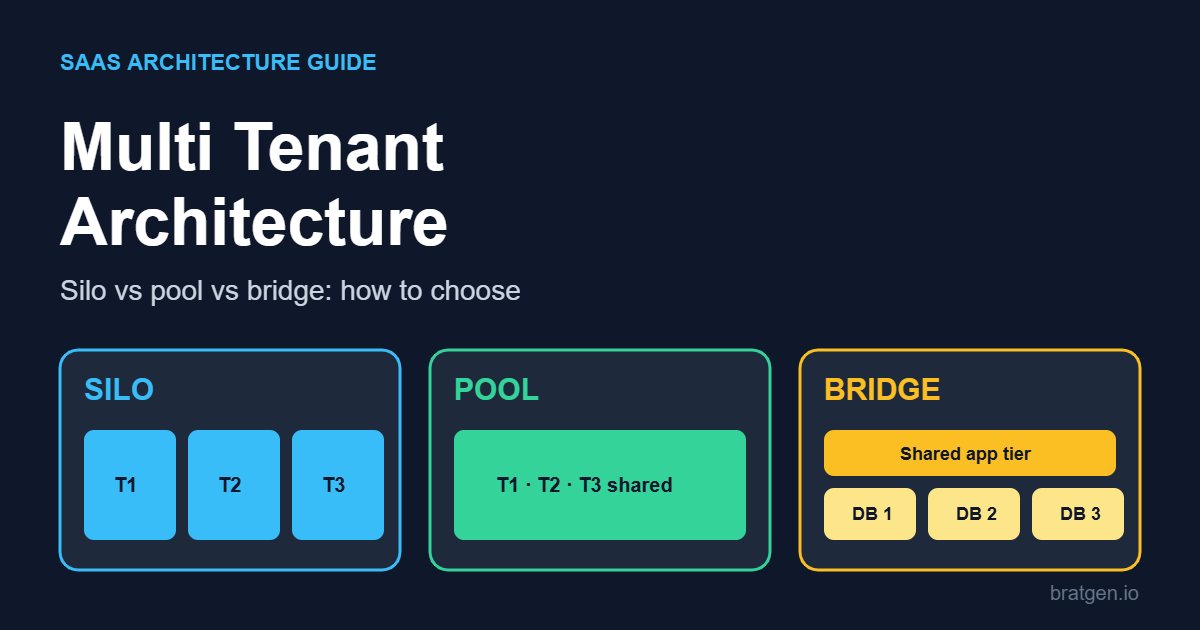
Amazon Web Services uses three names that have become the common vocabulary for multi tenant architecture. They describe how much of the system is dedicated to each tenant and how much is shared.
Silo model
In the silo model each tenant gets dedicated resources, such as a separate database or an entire independent stack. AWS notes that even in a silo, tenants usually still share one identity, onboarding and operations experience, so the vendor manages everyone through the same control plane. Silo suits regulated industries, large enterprise contracts and tenants whose workloads are heavy enough to disturb others.
Pool model
In the pool model tenants share resources: the same compute, the same storage and often the same tables. AWS calls this the more classic notion of multi-tenancy, and it delivers the best economies of scale and the simplest operations. The price is that isolation must be enforced in software, and noisy neighbors become your problem.
Bridge model
The bridge model mixes the two. Some services run pooled while others run siloed. For example, a product might pool its web tier and background workers but give each tenant a dedicated database. Azure describes the same pattern as a horizontally partitioned deployment, where some tiers are shared and others are per-tenant. In practice, bridge is where most mature SaaS products end up.
| Model | What is shared | Best for | Main risk |
|---|---|---|---|
| Silo | Only the control plane and tooling | Regulated data, large enterprise tenants | Cost and maintenance grow with every tenant |
| Pool | Compute, storage and schema | Many small tenants, fast growth | Data leaks and noisy neighbors |
| Bridge | Some layers shared, some dedicated | Mixed customer base with tiered plans | Complexity: the code must support both |
Multi tenant database architecture: four data patterns
The database is where multi tenant architecture gets tested hardest, because it holds the data you cannot afford to mix up. Azure’s guidance on multitenant storage describes several approaches, and they map neatly onto the models above.
1. Shared database, shared tables
Every tenant’s rows live in the same tables, and a tenant ID column identifies the owner. This gives the highest density and the lowest cost, with one database to back up, patch and monitor. The downsides are a hard ceiling on database size and throughput, noisy-neighbor risk, and difficulty restoring a single tenant. If one customer asks you to roll back their data, you may have to restore the entire database to a separate location and copy that tenant’s rows out.
2. Shared database with row-level security
Some databases, including Azure SQL Database and PostgreSQL, can enforce row-level security so a query automatically sees only the current tenant’s rows. It reduces the risk of a developer forgetting a tenant filter. Microsoft cautions that it is complex to design and test, and the tenant identity has to reach the database with every query, so many teams enforce tenancy in the application layer instead and use row-level security as a second safety net.
3. Database per tenant
Each tenant gets its own database while the application tier stays shared. This is the classic bridge design. It gives strong isolation, simple per-tenant backup and restore, and room for per-tenant customization. It costs more and needs automated provisioning and schema migration, but tools such as elastic pools can spread that cost across many small databases.
4. Sharding
Sharding splits tenants across several databases, with many tenants per shard. It scales to very large tenant counts and keeps density high, but you need a lookup layer that routes each request to the right shard. It is powerful and also the most operationally demanding pattern, so most teams adopt it only when a single shared database stops being enough.
One practical rule from the same guidance: avoid creating a separate table for each tenant, and avoid tenant-specific columns. Use shared tables with a tenant identifier, plus a dedicated table or a flexible field for genuinely custom data. Schema changes are then one migration, not hundreds.
The noisy neighbor problem
A noisy neighbor is a tenant whose heavy usage, such as huge exports, expensive reports or sudden traffic spikes, degrades performance for others sharing the same resources. It is the most common complaint about any multi tenant architecture, and it is the main reason customers on shared plans sometimes see slow pages at odd hours.
You rarely eliminate the problem, but you can contain it:
- Rate limits and quotas per tenant so no single customer can consume unlimited requests, storage or background jobs.
- Queues with fair scheduling so one tenant’s large batch job does not block everyone’s small tasks.
- Metering so you can see which tenants consume the most and price accordingly. Shared databases often cannot report per-tenant usage without extra instrumentation.
- Moving heavy tenants out to a dedicated database or stack, which is the bridge model in action.
- Load testing with an unbalanced tenant to confirm that one big customer does not push the rest past your performance targets.
AWS names two factors that push a service toward the silo model: the regulatory profile of its data and its noisy neighbor attributes. If either is strong, isolate that service even when the rest of your system stays pooled.
Security and tenant isolation
Isolation is the promise at the heart of multi tenant architecture: tenant A must never read, change or even detect tenant B’s data. The failures behind most real incidents are boring ones, such as a missing tenant filter in one query, a cache key that does not include the tenant ID, or a file stored in a shared bucket without a tenant prefix.
A sound baseline looks like this:
- Resolve the tenant once, early. Determine the tenant from the authenticated user, subdomain or token at the edge of the request, and pass it through the system as trusted context. Never accept a tenant ID from a request body.
- Enforce it in one place. Put tenant filtering in a shared data-access layer, not in every developer’s hand-written query.
- Add a second layer. Row-level security, per-tenant encryption keys or separate storage prefixes limit the damage if the first layer has a bug.
- Test across tenants. Write automated tests that log in as tenant A and try to fetch tenant B’s records, files and cached values. If those tests ever pass, you have found a leak.
- Log with the tenant ID. Audit trails and per-tenant logs make incident response easier, and they pair well with intrusion detection systems that watch shared infrastructure for abuse.
The same thinking applies to sign-in design. If you build tools around user accounts, our article on when a browser-based tool should ask users to sign in covers when identity is actually needed in the first place.
How to choose a multi tenant architecture model
Most articles stop at the definitions. In practice the right choice comes down to four questions, which you can answer in an afternoon.
Question 1: How many tenants will you have in two years?
Hundreds or thousands of small tenants point to pool, because per-tenant infrastructure will bury you in operations work. A few dozen large tenants point to silo or bridge, because each one is valuable enough to justify dedicated resources.
Question 2: What does your data require?
Health, finance and government data often arrive with contractual or legal requirements about where data lives and who can access it. If a buyer’s security team demands dedicated infrastructure or a specific region, your design needs a silo option for them, even if everyone else is pooled.
Question 3: How uneven is the usage?
If your biggest customer will be a hundred times heavier than your median one, a fully pooled database will not stay fair for long. Plan for the bridge model, with a path to move heavy tenants out.
Question 4: Can you automate?
Silo and bridge only work if provisioning, migrations and monitoring are automated. If you have a two-person team and no deployment automation, start pooled and add isolation later for the few tenants who truly need it.
| Your situation | Start with | Why |
|---|---|---|
| New SaaS, self-serve signups, small teams as customers | Pool (shared tables, tenant ID) | Lowest cost and fastest to ship |
| Self-serve base plus a few large accounts | Bridge (pooled app, dedicated database for big tenants) | Protects performance where it matters |
| Regulated industry, few high-value customers | Silo | Compliance and contract requirements come first |
| Hundreds of thousands of tiny tenants | Pool with sharding | Density and routing matter more than isolation |
The pattern that works for many teams is to design for the pool but build the seams for the bridge. Put a tenant ID on every record and every log line from day one, keep tenant lookup behind one service, and avoid hard-coding assumptions about a single database. Moving one tenant out of a pool is easy when the seams exist and painful when they do not. Azure describes this as a vertically partitioned approach: most tenants share infrastructure, and customers who need higher performance or stricter isolation get dedicated deployments, usually at a premium price.
A simple multi tenant architecture diagram in words
Many readers search for a multi tenant architecture diagram. You can sketch one on paper in five boxes, reading from the top down:
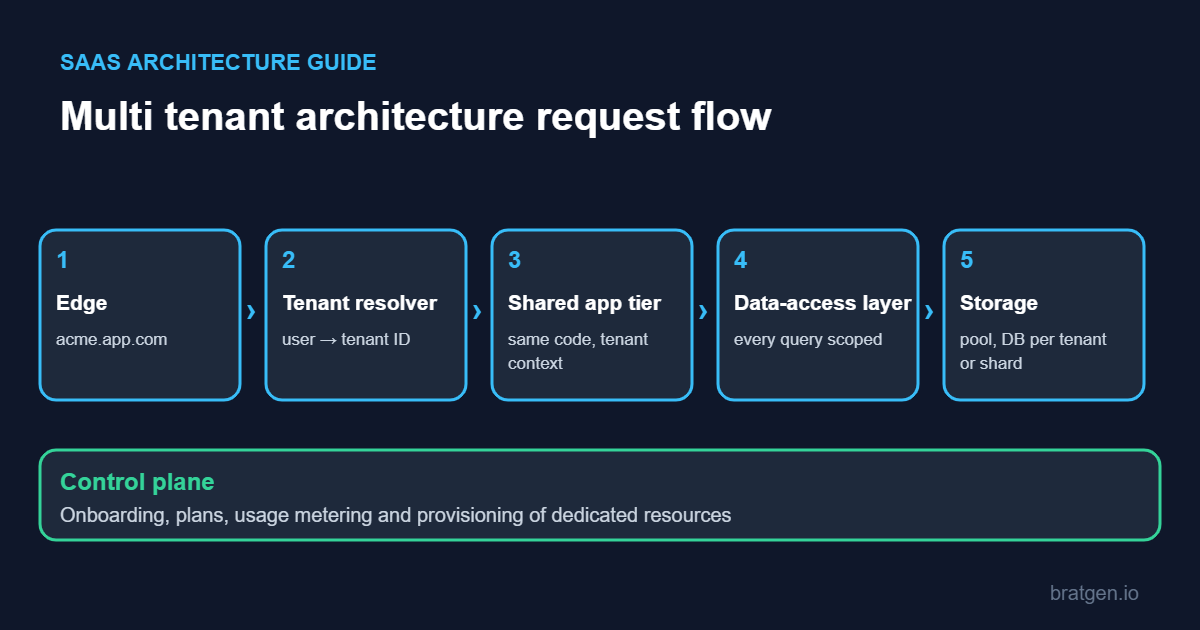
- Edge: the request arrives at a domain or subdomain, for example acme.yourapp.com.
- Tenant resolver: authentication identifies the user and looks up which tenant they belong to.
- Shared application tier: the same code runs for every tenant and receives the tenant context with each request.
- Data-access layer: every query is scoped by tenant, either by a tenant ID filter, a tenant-specific database connection, or both.
- Storage: a shared database, a database per tenant, or a shard, depending on the model you chose.
Beside this main path, add a control plane: the part that onboards new tenants, assigns plans, tracks usage and provisions dedicated resources. AWS notes that even siloed tenants usually share this control plane, which is what separates a true multi tenant architecture from a collection of unrelated single-tenant installs.
Common mistakes in multi tenant architecture
- Treating the tenant ID as optional. Retrofitting it into a live system is one of the most expensive migrations a SaaS company can face.
- Trusting the client. A tenant identifier taken from a URL parameter or request body is an invitation to cross-tenant access.
- Forgetting caches, queues and files. The database may be perfectly scoped while the cache key, background job payload or file path is not.
- Customizing the schema per tenant. Per-customer columns and tables multiply migration work and slow every release.
- Ignoring per-tenant backup and restore. Customers will eventually ask to roll back only their own data; plan for it before they ask.
- Skipping metering. Without per-tenant usage numbers you cannot find noisy neighbors or price plans sensibly.
- Assuming the model is permanent. A system that starts pooled can add silo options later, if you design the seams early.
Multi tenant architecture FAQ
What is multi tenant architecture in simple words?
It is a software design where one application serves many customers at the same time. Each customer’s data is kept separate, but the code and much of the infrastructure are shared, which keeps costs low.
What is the difference between single-tenant and multi tenant architecture?
Single-tenant gives each customer their own deployment, which means stronger isolation and higher cost. A multi tenant architecture shares infrastructure between customers, which lowers cost and simplifies updates but needs careful isolation and performance controls.
Is multi tenant architecture secure?
It can be, when tenant isolation is enforced consistently, tested across tenants and backed by a second layer such as row-level security or per-tenant keys. Weak implementations, not the model itself, are behind most data-exposure incidents.
What is the noisy neighbor problem?
It happens when one tenant’s heavy use of shared resources slows down other tenants. Quotas, rate limits, fair queues and moving heavy tenants to dedicated resources are the usual fixes.
Which is better, database per tenant or shared database?
Neither is universally better. A shared database is cheaper and simpler for many small tenants. A database per tenant gives stronger isolation and easier per-tenant restore, at higher cost. Many products use a shared database by default and dedicated databases for larger customers.
Do all SaaS products use multi tenant architecture?
Most do in some form, but not always at every layer. Many products pool their application tier and silo only specific components, which is the bridge model.
Final thoughts
A multi tenant architecture is less a single technology than a set of decisions about sharing: what is shared, what is dedicated, and how you prove the boundary holds. Start from your tenant count, your data requirements and your automation maturity. Pool by default, isolate where regulation or heavy usage demands it, and build the seams early so a tenant can move from pool to silo without a rewrite.
If you remember one thing, make it this: put the tenant ID everywhere from day one, and test the boundary like an attacker would.
Sources: NIST SP 800-145, Microsoft Azure Architecture Center: tenancy models, Azure: multitenant storage and data approaches, AWS SaaS Lens: silo, pool and bridge models.