How to Choose Keyboard Keycap: Materials, Profiles, Sizes, and Compatibility
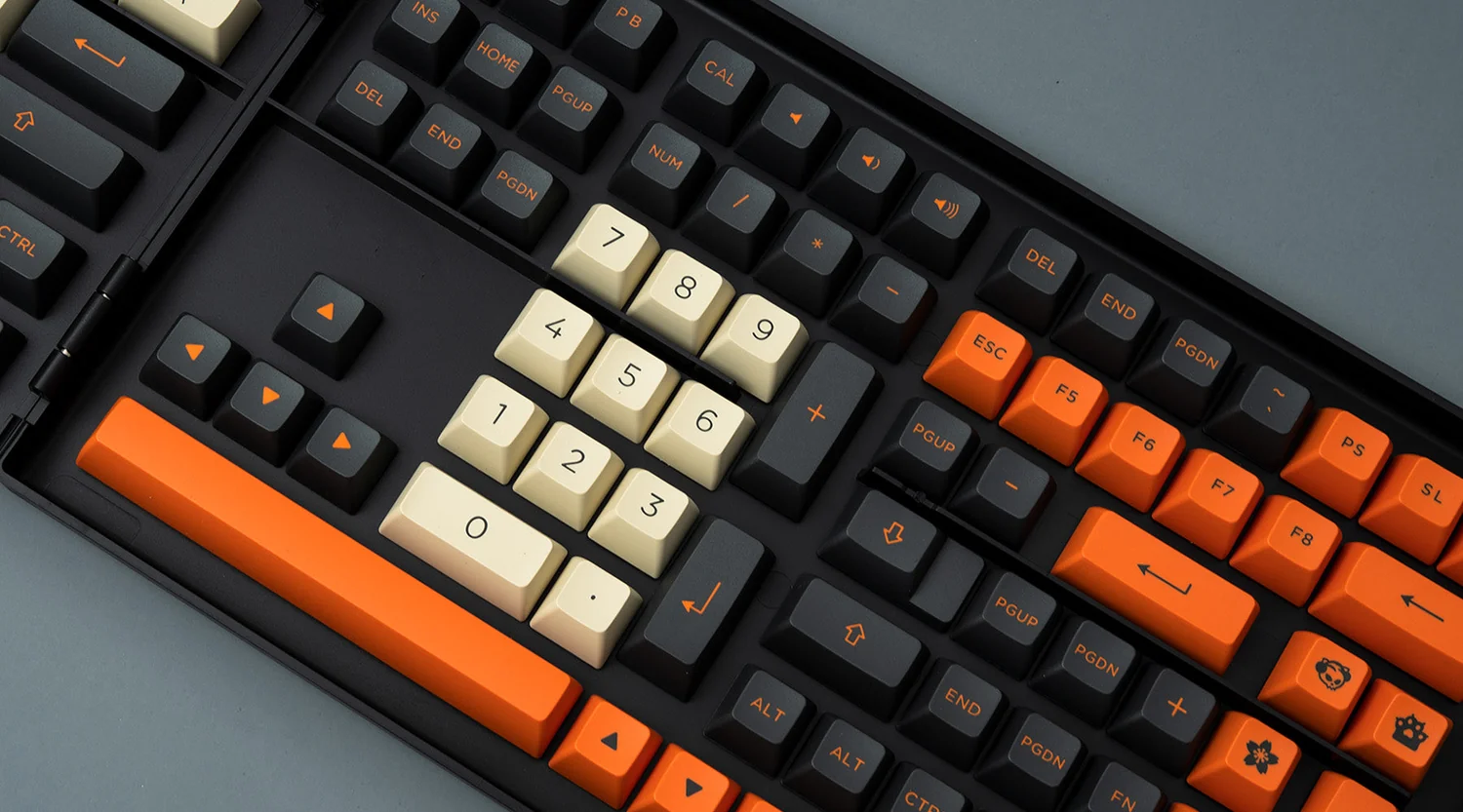
A keyboard keycap may look like a small part of a keyboard, but it has a noticeable effect on how a mechanical keyboard looks, feels, and sounds. Changing the keycaps is also one of the easiest ways to personalize a keyboard without replacing the switches, PCB, or entire board.
However, choosing a keyboard keycap set is not as simple as picking a color you like. Material, keycap profile, keycap size, switch compatibility, keyboard layout, and legend printing can all affect whether a set is a good fit.
For example, a PBT keycap set may be attractive to someone who types for several hours a day because of its textured surface and resistance to developing a glossy appearance. A gamer may instead prioritize a particular profile, RGB compatibility, or a set that includes the right keys for a compact layout.
This guide explains the main factors to consider before buying keyboard keycaps, so you can choose a set that matches your keyboard and your everyday use.
What Should You Consider Before Buying Keyboard Keycap?
Before ordering a new keycap set, check five things: material, profile, compatibility, layout, and legend style.
Material affects surface texture, durability, appearance, and sometimes sound. The most common choices are ABS and PBT, although specialty options such as ceramic and metal are also available.
Profile describes the shape and height of the keycaps. Cherry, OEM, SA, and XDA are some of the profiles you are likely to encounter. Different profiles can change finger positioning and the overall typing experience.
Compatibility is equally important. Most modern mechanical keyboards use MX-style switch stems, but not every mechanical keyboard uses the same stem design. Low-profile switches and older switch designs may require dedicated keycaps.
Finally, check the layout and included keys. A 60% keyboard, 65% keyboard, 75% keyboard, TKL keyboard, and full-size keyboard do not require exactly the same key set.
Why Do Keycaps Affect Typing Feel, Sound, and Appearance?
Your fingers directly contact the keycaps every time you type, so their shape and surface naturally influence the experience.
A taller profile can provide a more pronounced sculpted shape, while a lower profile may feel flatter and quicker to move across. Material and thickness can also influence the sound produced when the key is pressed.
The difference is especially noticeable when comparing two otherwise similar keyboards with different keycap sets. The switches may remain unchanged, but the keyboard can still feel and sound different.
Which Keycap Material Is Best: PBT, ABS, or Other Options?
There is no single material that is best for every keyboard user. PBT and ABS are the two materials you will encounter most often, and each has characteristics that may make it more suitable for different applications.
CHERRY notes that ABS is widely used because it is comparatively easy and cost-effective to manufacture, while PBT is generally more resistant to abrasion and has a more textured surface.
| Keycap Material | Typical Characteristics | Good For |
| PBT | Textured feel, good abrasion resistance, generally durable | Everyday typing, gaming, long-term use |
| ABS | Smooth feel, bright colors, wide manufacturing options | RGB keyboards, colorful designs, enthusiasts |
| Ceramic | Smooth, dense, distinctive sound | Specialty/custom builds |
| Metal | Heavy, solid feel, premium appearance | Custom and enthusiast keyboards |
In practice, PBT and ABS each have their own advantages, and neither is simply better. High-end keycap sets are usually ABS double-shot, because ABS takes color extremely well — allowing brighter, more accurate colors — and double-shot legends never wear off. PBT, by contrast, is prized for longevity, a deeper, thockier sound profile, and lower production cost when made with dye-sublimation. You can browse both at UniKeys: ABS double-shot keycaps and PBT dye-sub keycaps.
For the best ABS double-shot sets, GMK and KeyKoBo remain the benchmark. Their molds are highly precise, they use good-quality ABS, and their mature double-shot injection process delivers consistent, accurate coloring, crisp legends, and clean tolerances.
For PBT dye-sublimated sets, Monster Lab and TUT are excellent choices. They use good PBT material with a high PBT content and a mature dye-sub process that keeps colors accurate and legends sharp — without the smudging or fuzzy legends common on cheaper PBT keycaps.
PBT vs ABS Keycaps: Which One Should You Choose?
PBT keycaps are a popular choice for everyday mechanical keyboards. PBT, or polybutylene terephthalate, generally has a slightly rougher texture than ABS. This can provide a more tactile surface for users who type frequently.
PBT also tends to resist the glossy appearance that can develop on frequently used ABS keycaps. CHERRY describes PBT as more abrasion-resistant than ABS, although actual durability depends on factors such as material formulation, thickness, and manufacturing quality.
ABS keycaps, or acrylonitrile butadiene styrene keycaps, are usually smoother. They can also produce bright and saturated colors, making ABS popular for colorful or RGB-focused designs.
That does not mean all ABS keycaps are low quality. Manufacturing quality matters considerably. High-quality ABS keycaps can offer excellent consistency, smooth surfaces, and durable construction.
For a keyboard used mainly for office work, programming, or general typing, PBT is often a practical starting point. If you care more about smoothness, vibrant colors, or certain enthusiast keycap designs, ABS can also be a good option.
Are Other Keyboard Keycap Materials Worth Considering?
Specialty materials are available if you want something beyond conventional plastic.
Ceramic keycaps can provide a heavier and more distinctive feel. They are generally purchased as specialty or enthusiast products rather than as a default choice for a first mechanical keyboard.
Metal keycaps are another enthusiast option. Their higher density can make individual keys feel more substantial, but they may also introduce a different acoustic character. WIRED’s hands-on testing of metal keycap sets also found that manufacturing tolerances can be an important consideration when fitting metal keycaps onto switches.
For most users, however, PBT and ABS remain the practical choices because they offer a good balance of cost, availability, comfort, and design options.
Which Keycap Profile Should You Choose?
Keycap profile refers to the shape, height, and sculpting of the keycap. It is one of the most important factors affecting how a keyboard feels under your fingers.
Common profiles include Cherry, OEM, SA, and XDA. There are also many less common profiles, and naming conventions are not completely standardized across manufacturers. WIRED specifically points out that profile names can vary between manufacturers, so checking the actual dimensions and profile description is useful when comparing sets.
Cherry vs OEM vs SA vs XDA: What Is the Difference?
Cherry profile is a popular medium-height profile with sculpted rows. It is commonly found on mechanical keyboards and aftermarket keycap sets. Many users choose it when they want a relatively familiar typing shape without the height of a traditional high-profile keycap.
OEM profile is also widely used on prebuilt mechanical keyboards. It is sculpted across different rows and is generally easy to find when replacing the original keycaps on a conventional mechanical keyboard.
SA profile is substantially taller and has a more pronounced sculpted appearance. Its height can create a different typing feel and a deeper sound depending on the rest of the keyboard.
XDA profile is generally associated with a more uniform shape, meaning the rows can have a similar height and surface shape. This makes XDA visually distinctive and useful for people who prefer a flatter, more consistent layout.
| Profile | General Shape | Typical User Preference |
| Cherry | Medium height, sculpted | General typing, gaming, custom builds |
| OEM | Medium height, sculpted | Prebuilt and replacement keyboards |
| SA | Tall, strongly sculpted | Enthusiast builds, distinctive feel |
| XDA | Broad, relatively uniform | Minimalist/custom layouts |
The best profile is largely subjective. If you already enjoy the feel of your current keyboard, choosing a similar profile is usually a sensible starting point.
Are Sculpted or Uniform Keycap Profiles Better?
Sculpted keycaps use different shapes or heights across rows. This creates a more defined contour for your fingers and can make it easier to distinguish rows while typing.
Uniform keycaps use a more consistent shape across the keyboard. Some users prefer this because it gives them greater freedom when arranging keys or customizing layouts.
For traditional touch typing, a sculpted profile such as Cherry or OEM may feel familiar. For custom keyboards, gaming setups, or users who frequently rearrange their keycaps, a uniform profile such as XDA may be more convenient.
Neither design is universally better. Your typing style and personal preference matter more than the label itself.
Will These Keyboard Keycaps Fit Your Keyboard?
Compatibility should be checked before you buy a keycap set.
A keycap can look perfect in a product photo but still be unusable if its stem, dimensions, or included keys do not match your keyboard.
The first thing to check is the switch stem. Many modern mechanical keyboards use an MX-style stem with a cross-shaped connection. This is why a large number of aftermarket keycap sets are designed for MX-compatible switches.
However, other switch designs exist. WIRED identifies Alps-style, Topre/EC, and Kailh Choc low-profile switches as examples that require different keycap compatibility considerations.
How Do Keyboard Layouts Affect Keycap Compatibility?
Keyboard size does not only describe the physical width of the keyboard. It also determines which keys are present and the dimensions of certain keys.
For example:
Full-size keyboards generally include a complete number pad, navigation cluster, arrow keys, and function row.
TKL keyboards remove the number pad but retain most standard keys.
75% keyboards keep the function row and navigation keys in a more compact arrangement.
65% keyboards usually retain arrow keys but remove the function row.
60% keyboards remove the dedicated arrow keys, function row, and navigation cluster.
The spacebar, Shift, Enter, Backspace, and bottom-row keys can also vary in width depending on the keyboard.
This is why buying a set advertised as “compatible with 60% keyboards” does not automatically guarantee compatibility with every 60% keyboard.
Some custom boards use non-standard bottom rows or unusual right Shift and spacebar sizes. A complete keycap set may therefore include additional compatibility keys, often called modifier or compatibility kits.
What Should You Check Before Buying a Keycap Set?
Before purchasing, use this checklist:
1. Check the switch stem
Confirm whether your keyboard uses MX-style, low-profile, Topre, Alps, or another switch design.
2. Identify your keyboard layout
Determine whether you have a full-size, TKL, 75%, 65%, 60%, or another layout.
3. Check the spacebar
Spacebars are not universally the same width. This is one of the most common reasons a replacement keycap set may fail to provide complete coverage.
4. Check the bottom row
Ctrl, Alt, Windows/Command, Fn, and other modifier keys can vary in size and position.
5. Check special keys
Some keyboards have unusual Enter, Shift, Backspace, or navigation keys.
6. Check the keycap profile
If you mix different profiles, the rows may not line up correctly. For a clean and predictable typing experience, using a complete set from the same profile is generally easier.
7. Check RGB compatibility
If your keyboard has RGB lighting, look at the keycap construction. Double-shot keycaps and translucent or “pudding” designs can provide different lighting effects.
Once you know your keyboard’s layout and switch type, you can browse a dedicated keyboard keycap collection and compare materials, profiles, colors, and set configurations.
Recommended Keycap Brands at UniKeys
If you are not sure where to start, our best-selling keycap brands are a safe bet. For ABS double-shot, GMK and KeyKoBo lead on color accuracy and legend quality. For PBT dye-sub, Monster Lab and TUT offer excellent material with clean, long-lasting legends. You can explore the full range in our keycaps collection.
Conclusion
Choosing a keyboard keycap is ultimately about matching the keycap to both your keyboard and your way of using it.
For many everyday users, PBT is a practical starting point because of its textured surface and resistance to visible wear. ABS can be attractive if you prefer a smoother feel, vibrant colors, or specific enthusiast designs.
Profile is just as important. Cherry and OEM offer familiar sculpted shapes, SA provides a taller and more distinctive experience, while XDA offers a relatively uniform design.
Most importantly, do not choose keycaps based on appearance alone. Check the switch stem, keyboard layout, key sizes, spacebar, bottom row, profile, and included compatibility keys before purchasing.
If you are replacing your first set of keycaps, starting with a compatible PBT or ABS set in a profile similar to your existing keyboard is usually a straightforward way to customize the board without changing the rest of the hardware.
FAQs
What is the best keycap material for everyday use?
PBT is a practical choice for many everyday users because it generally offers good abrasion resistance and a textured surface. ABS is also a reasonable option, particularly if you prefer a smoother feel and brighter colors. Quality and manufacturing thickness can make a meaningful difference, so material alone should not determine your purchase.
What keycap profile is best for beginners?
Cherry and OEM profiles are reasonable starting points because they are widely available and use familiar sculpted shapes. If you already enjoy the feel of your current keyboard, choosing a similar profile can make the transition easier.
Can I use any keycap set on a mechanical keyboard?
No. Keycap compatibility depends on the switch stem, keyboard layout, key sizes, and profile. Many modern mechanical keyboards use MX-style stems, but low-profile and other switch systems can require dedicated keycaps. You should also verify the spacebar, bottom row, Shift keys, and other non-standard keys before purchasing.