
Best Social Media Management Tools in 2026, Compared
Posting to one platform by hand is manageable. Posting to four or five, on a schedule, while tracking what actually worked, is where most people start looking for a real tool rather than a sticky note taped to a monitor. The category has also quietly reshuffled over the past few years, with some once-free tools now charging from day one and others still getting recommended based on pricing that no longer exists. This guide compares the best social media management tools for 2026 and corrects two specific details that keep showing up wrong in other roundups.
Why Manual Posting Stops Working Around Three Platforms
Two social accounts are manageable by memory. Three or more, especially across different platforms with different peak times and formats, is where posts start getting missed, duplicated or published at the wrong hour because nobody caught the time zone. A dedicated tool like SocialThink solves that specific problem by queuing content in advance and, in stronger options, reporting back on what actually performed once it went live.
The category has consolidated hard around a handful of names but pricing and free-tier availability inside that shortlist has shifted more than most people tracking it casually would expect, which is exactly where outdated advice keeps circulating.
How This Comparison Was Built
This list favors tools with a genuinely current, verifiable free tier or a clearly stated entry price, since free-plan availability in this category has changed enough in the past few years that older comparisons are a real risk to trust blindly. Each entry was checked against its own official pricing page rather than a secondhand summary and judged on platform coverage, whether analytics go beyond a simple post count and how the tool scales from a solo account to a small team.
Quick Comparison Table
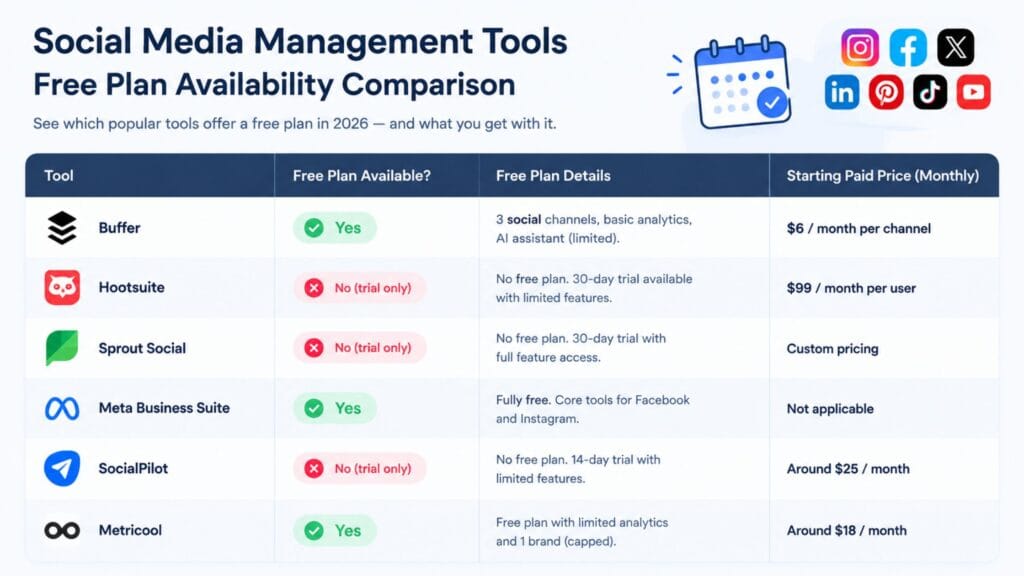
| Tool | Best For | Free Plan | Entry Paid Price |
| Buffer | Solo creators and small teams | Yes, 3 channels | 6 dollars a month per channel |
| Hootsuite | Larger teams needing social listening | No, trial only | 99 dollars a month per user |
| Sprout Social | Analytics-heavy teams and agencies | No, trial only | Custom, enterprise pricing |
| Meta Business Suite | Facebook and Instagram only, at no cost | Yes, fully free | Not applicable |
| SocialPilot | Agencies managing multiple clients | No, trial only | Around 25 dollars a month |
| Metricool | Analytics on a budget | Yes, capped | Around 18 dollars a month |
Buffer: The Simplest Way to Stop Missing a Posting Day
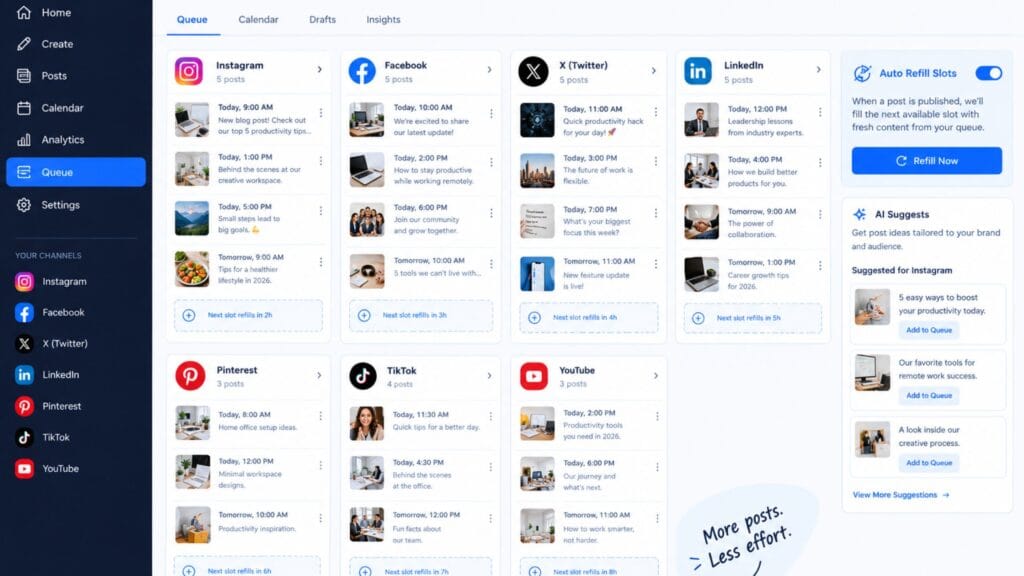
Buffer earns its reputation for staying simple even as more accounts get added, with a queue-based interface that shows upcoming posts as a straightforward list rather than a dense dashboard full of streams and tabs. Its free plan connects three channels, includes an AI assistant for drafting caption variants and covers most of what a solo creator or a very small team actually needs day to day.
It intentionally stays a publishing tool rather than a full operations platform, with no unified inbox, no social listening and no formal approval workflow at its entry tiers. For anyone who wants scheduling without turning tool selection into its own project, that restraint tends to be an advantage rather than a missing feature.
Hootsuite: Built for Teams, Not Solo Creators Anymore
Hootsuite has been in this category since 2008 and its feature depth reflects that history, with social listening, competitive benchmarking and a unified inbox built for organizations managing complexity across many accounts and several team members at once. For a larger team that genuinely needs those features in one workspace, it remains a reasonable fit.
What has changed and what several other comparison articles have not updated, is that Hootsuite removed its free-forever plan back in 2022. It now offers only a 30-day trial before billing begins, starting around 99 dollars a month per user. Any list still describing Hootsuite as free is working from pricing that stopped being accurate several years ago.
Sprout Social: When Listening Matters as Much as Publishing
Sprout Social positions itself around the idea that publishing is only half the job, pairing scheduling with genuinely deep social listening, sentiment tracking and reporting built for teams that need to justify social spend to people outside the marketing department. Its CRM-style integrations also make it a stronger fit for organizations that already track customer interactions elsewhere.
There is no permanent free tier, only a trial and pricing sits at the enterprise end of this category. For a small creator or solo business, that depth is usually more than the job requires and the cost reflects that.
Meta Business Suite: The Free Option Already Sitting Inside Facebook
Meta Business Suite ships built into Facebook and lets you schedule unlimited posts to both Facebook and Instagram at no cost, with no separate account or subscription required. For a small business posting only to Meta’s own platforms, this is a genuinely capable option that a surprising number of people pay a third-party tool for instead.
The obvious limitation is platform coverage, since it only handles Meta’s own properties and has nothing to offer for TikTok, LinkedIn or X. Pairing it with Buffer’s free plan for the other channels covers a small operation’s entire footprint without paying for either tool.
SocialPilot: Built for Agencies Running Several Clients at Once
SocialPilot leans into multi-client management with white-label reporting, client approval workflows and pricing structured around managing several separate brand accounts rather than one. For an agency billing clients for social management specifically, those client-facing reports are worth more than a marginally nicer scheduling interface.
It runs on a trial rather than a permanent free tier and its value becomes clearest once you are managing enough separate accounts that per-client reporting actually saves real time rather than being a nice-to-have.
Metricool: Free Analytics With a Real, Honest Ceiling
Metricool leads with analytics depth relative to its price and its free tier genuinely includes scheduling alongside real reporting rather than gating every useful metric behind a paywall. The tradeoff is a capped number of scheduled posts per month on that free tier, a real limit rather than a technicality.
For a creator or small business that wants to see actual performance data without committing to a paid plan first, Metricool’s free tier is a reasonable way to judge whether deeper analytics are worth paying for at all.
Two Details Almost Every Other Comparison Gets Wrong
The first is Hootsuite’s free plan, covered above, which stopped existing in 2022 but keeps getting listed as current in articles that were never updated after that change.
The second is more subtle. Buffer’s free plan is widely described as a cap of 10 posts a month, when its own pricing page actually frames the limit differently: 10 scheduled posts can sit in a channel’s queue at any moment and the slot frees up the instant one publishes. That means a channel posting once a day can comfortably publish well over 10 posts across a month on the free plan, since the limit governs how far ahead you can batch-schedule, not the total volume you can publish over time.
Both corrections matter for the same reason: pricing and limits in this category change often enough that a comparison written even two years ago can be actively misleading today, which is worth remembering the next time a listicle presents its numbers with total confidence.
What to Check Before Trusting Any Pricing Page
Beyond the two corrections above, a few habits protect you from the same kind of stale-pricing problem repeating with a different tool. Check the date on any article discussing free-tier limits, since this category has moved fast enough in the past two years that even a six-month-old post can already be wrong about a specific number.
When a tool’s pricing is charged per channel rather than per seat, model your actual channel count before comparing sticker prices, since a per-channel tool that looks cheaper at three accounts can cost more than a flat-rate competitor once you pass ten or fifteen. Finally, treat any free tier described only as generous or limited without a specific number as a signal to check the source directly rather than take the summary at face value.
Matching a Tool to Your Actual Team Size
Start with Buffer if you are a solo creator or a very small team and want scheduling without a learning curve and pair it with Meta Business Suite specifically if Facebook and Instagram cover most of your posting already. Move to Hootsuite or Sprout Social once social listening, a unified inbox or team approval workflows become a genuine daily need rather than a feature you might use eventually.
Choose SocialPilot specifically if you are managing multiple client accounts and need client-facing reporting built in and consider Metricool if analytics depth matters more to you than the scheduling interface itself.
Once your posting schedule is handled, the rest of the workflow benefits from the same attention. Our guides to the best time to post on Instagram and TikTok and the best link in bio tools cover the timing and destination side of the same publishing routine and the free text and font tools on this site are worth a look for styling anything you post through whichever scheduler you land on.
FAQs
What is the best free social media management tool?
Buffer offers the most genuinely usable free plan among the major names, covering three channels with an AI drafting assistant. Meta Business Suite is worth pairing with it if most of your posting happens on Facebook and Instagram, since it is unlimited and free with no separate account needed.
Does Hootsuite have a free plan?
No, Hootsuite removed its permanent free plan in 2022 and now only offers a 30-day trial before billing starts around 99 dollars a month per user. Some older comparison articles have not been updated to reflect this.
Is Buffer’s free plan really limited to 10 posts a month?
No, that is a common misreading of the limit. Buffer’s free plan allows 10 scheduled posts to sit in a channel’s queue at once and that slot refills as soon as a post publishes, so a channel can publish well beyond 10 posts across a full month as long as the queue itself never exceeds 10 at a time.
What is the best social media management tool for agencies?
SocialPilot is built specifically around managing several client accounts with white-label reporting and approval workflows, which makes it a stronger fit for agency use than tools built primarily for a single account.
What is the best social media management tool for a small business on a tight budget?
Buffer’s free plan combined with Meta Business Suite covers most small businesses posting a handful of times a week across two or three platforms at no cost at all. Metricool is worth adding once you want deeper analytics without paying for a full enterprise platform.
Do these tools support AI-generated captions?
Most major tools in this category now include some AI drafting feature, Buffer’s AI Assistant and Hootsuite’s OwlyWriter among them, though quality and how well they match your specific brand voice varies enough that testing with your own content matters more than the feature checklist alone.
Conclusion
The right social media management tool depends less on which name is most recognizable and more on whether its current pricing still matches what you read about it. Confirm a tool’s actual free-plan status and posting limits directly on its own pricing page before choosing based on a comparison, including this one, since this entire category has proven how quickly those details go stale.