SIM Swap Fraud: How Criminals Steal Your Phone Number and Take Over Your Accounts
Your phone number does more than take calls. It resets your passwords. It approves your bank transfers. It proves you are you.
That makes it worth stealing, and there is a simple way to do it. A criminal convinces your mobile provider to move your number onto a SIM card they control. No hacking, no malware, and they never touch your phone. This is called SIM swap fraud, and the FBI logged 971 reports of it in 2025.
Governments have started treating this as a design flaw rather than bad luck, and two fixes are spreading. One ties every SIM card to a named, verified person. The other retires the text message code as a way to approve payments. The Philippines is the clearest live example of both, so its SIM registration rules are worth a look if you hold a number there. The rest of this guide covers the attack itself, and what you can fix today without waiting on a regulator.
What Is SIM Swap Fraud?
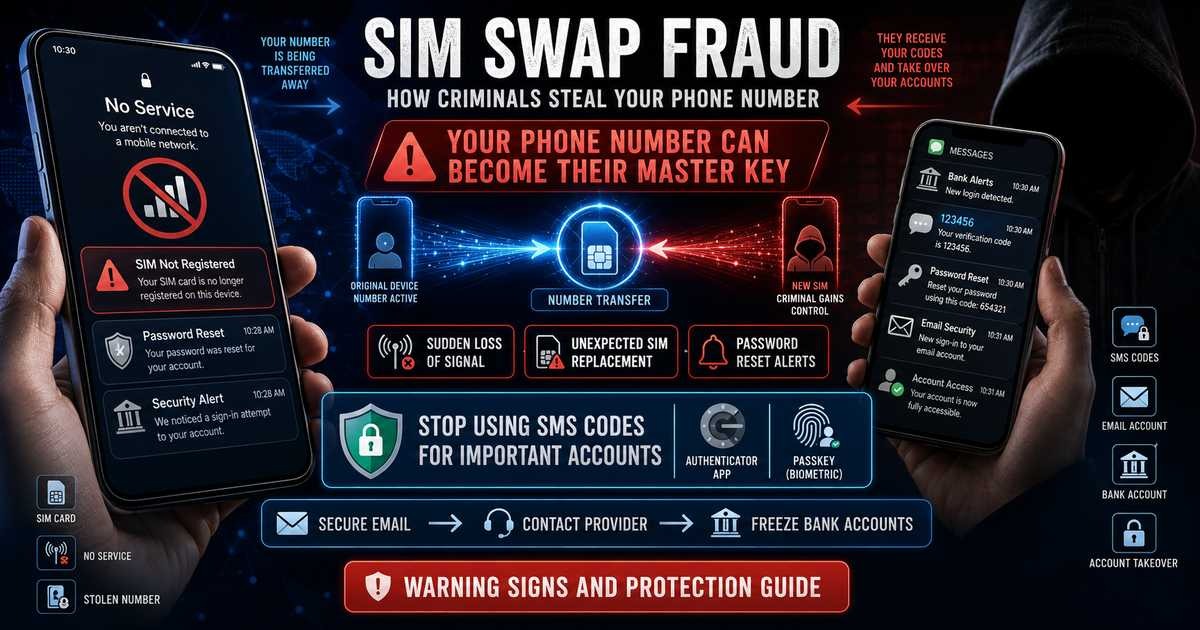
SIM swap fraud is when a criminal tricks your mobile provider into moving your phone number to a SIM card they control. Once the move is done, your calls and texts go to their phone instead of yours.
You may also see it called SIM hijacking, SIM splitting, simjacking, or a port-out scam. The names change. The trick is the same.
The attacker does not need to touch your phone. They do not need your password. They only need to convince one support agent that they are you.
How Does a SIM Swap Attack Work?
Most attacks follow four steps.
Step 1: They collect your details.
Your name, birthday, address, and mother’s maiden name are often already public. Data breaches and social media fill in the rest.
Step 2: They contact your provider.
They call, chat, or walk into a store. They say the phone was lost or the SIM stopped working. They ask for a replacement.
Step 3: The number moves.
The provider activates a new SIM. Your phone drops off the network. Their phone picks it up.
Step 4: They reset everything.
They tap “Forgot password” on your email. The code arrives on their phone. From your email, they reach your bank, your wallet apps, and your social accounts.
The whole process can take under an hour.
Why Your Phone Number Became a Master Key
Years ago a phone number was just a way to reach someone. Now it sits at the centre of your digital life.
Banks send one-time codes by text. Email providers use your number to recover locked accounts. Payment apps tie your wallet to it. Social platforms use it to confirm logins.
That means one stolen number can open many doors at once. Security experts call this a single point of failure. Your number was never designed to be a password, but it ended up working like one.
How Common Is SIM Swap Fraud?
The numbers are smaller than other online crimes, but the damage per victim is heavy.
The FBI’s Internet Crime Complaint Center logged 971 SIM swap complaints in 2025, 982 in 2024, and 1,075 in 2023. Reported losses reached $25,983,946 in 2024, and SIM swapping ranked among the top five cyber threats reported to the centre in 2025, at 10 percent of that group.
Other countries report sharp jumps. Fraud prevention service Cifas recorded close to 3,000 unauthorised SIM swaps in the UK in 2024, a rise it described as 1,055 percent. In Australia, IDCARE reported a 240 percent increase in people asking for help with SIM swap and phone porting fraud in 2024 compared with 2023, and said 90 percent happened without any action by the victim.
That last detail matters. In most cases the victim did nothing wrong. They just lost signal.
Warning Signs Your SIM Has Been Swapped
Act fast if you notice any of these.
- Your phone shows no service while other phones nearby work fine
- You cannot make calls or send texts, but Wi-Fi still works
- You get a text about a SIM replacement or number transfer you did not request
- Friends say your calls ring out or go straight to voicemail
- You receive password reset emails you did not ask for
- Your banking or wallet app signs you out and will not let you back in
Sudden signal loss with no storm, no outage, and no unpaid bill is the clearest early warning.
One thing to rule out first. In countries that require SIM registration, a line can also go dead because the paperwork failed, not because anyone attacked you. The two look identical from the outside: no service, no calls, no texts. The difference is what you do next, so it is worth knowing which one you are dealing with before you start locking accounts.
How to Protect Your Accounts
None of these steps cost money. Most take under ten minutes.
1. Stop using text messages for two-step verification. Switch to an authenticator app such as Google Authenticator, Microsoft Authenticator, or Authy. These make codes on your device. They do not travel through the phone network, so a stolen number cannot reach them.
2. Use passkeys where they are offered. A passkey is a login tied to your device and your fingerprint or face. There is no code to steal and no password to phish. Major banks, email providers, and shops now support them.
3. Set a SIM PIN on your phone. This is not your screen lock. It is a short code that locks the SIM itself. If someone pulls your SIM and puts it in another phone, it will not work. You will find it under your phone’s mobile or cellular settings.
4. Add a PIN or lock to your provider account. Ask your provider for an account PIN, a port-out lock, or a SIM change block. This forces an extra check before your number can move. Pick a code that is not your birthday or address.
5. Take your number off account recovery. For your most important accounts, remove the phone number as a backup method. Use backup codes or a second email instead. Print the backup codes and keep them somewhere safe.
6. Share less about yourself online. Those quizzes asking for your first pet and street name feed the exact answers used in security questions. Attackers read them too.
7. Turn on alerts for money movement. Set your bank and wallet apps to notify you for every transfer. If you lose signal, you still get app alerts over Wi-Fi.
What to Do in the First Hour
Speed decides how much you lose. Work in this order.
- Get to Wi-Fi. Without signal, Wi-Fi is your only way to act.
- Call your provider from another phone. Report a suspected SIM swap. Ask them to cancel the new SIM and return the number to you. Ask for a written record.
- Freeze your money. Contact your bank and your wallet apps and ask them to lock your accounts.
- Change your email password first. Email is the master key to everything else. Secure it before anything else.
- Remove the attacker’s access. Sign out of all devices, then check for new recovery emails or forwarding rules you did not add.
- File a report. A police or cybercrime report creates the paper trail you need for any refund claim.
Write down every time, name, and reference number. Refund disputes turn on records.
Why Some Countries Now Register Every SIM
Governments noticed that anonymous SIM cards make this crime easy. Several now require every SIM to be linked to a real, verified person.
The Philippines took this route with the SIM Registration Act, which requires every SIM to be registered to an identified user, with a full name, birth date, address, and valid ID, before it can be activated. Unregistered SIMs are switched off. The idea is simple. If a SIM has a name attached, a criminal cannot hide behind it.
The effort has produced results. Providers there blocked more than 3.3 billion scam messages and switched off over 3.1 million SIMs in a single year. For subscribers, the practical duty is small: register each number you own and keep the record, or the line gets switched off. This is also the reason a dead line there is not automatically a crime, and knowing why a registered SIM can still be deactivated saves a lot of panic.
Registration is not a complete fix. The country’s telecoms regulator is already reviewing the law, because a proposal is on the table to require people to appear in person to register, the way they do for a driver’s licence. Still, it raises the cost of the crime.
The Bigger Shift: Text Codes Are Being Retired
Regulators have started treating SMS codes as unsafe by design.
The Philippine central bank has ordered banks, digital banks, and wallet providers to stop using text and email codes to approve high-risk transactions. The rule took effect on 30 June 2026. Codes may still confirm that you own a number, but they can no longer approve a payment. Approvals now move to in-app prompts, fingerprint and face checks, and passkeys.
The part that will change behaviour is the money. Under the law behind the rule, an institution that fails to put strong checks in place has to repay customers who lose funds to a scam. One that complies is shielded.
Other regulators are moving the same way. If your bank still texts you a six-digit code to approve a transfer, expect that to change.
Frequently Asked Questions
Can someone SIM swap me without my phone?
Yes. The attack targets your provider, not your handset. Your phone stays in your pocket the whole time.
Will I know right away?
Usually, because your phone loses service. But if it happens overnight or while your phone is off, you may not notice for hours.
Is an eSIM safer than a physical SIM?
Slightly, since there is no card to steal or ship. The bigger risk is social engineering at the provider, and that applies to both.
Can I get my money back?
It depends on where you live and whether the bank or provider followed the rules. Fast reporting and good records improve your chances a lot.
What single change helps most?
Move your important accounts off text codes and onto an authenticator app or passkey. That one change removes the reason to steal your number.
The Short Version
Your phone number is a weak lock guarding strong doors. The fix is to stop using it as a key.
Switch your accounts to an authenticator app or passkey. Put a PIN on your SIM and a lock on your provider account. And if your phone loses signal for no reason, treat it as an emergency, not an annoyance.