PSA Birth Certificate Online: Request and Verify Your Record
Two things matter when getting a document. First, the request must go through correctly. Second, what arrives must be real. Skip the first step, and nothing shows up. Skipping the second step and a fake document causes big problems later. Requesting a psa birth certificate online covers both parts. The online system handles the request. The security features on the paper allow verification. This guide walks through requesting and verifying in plain steps.
Part One: Requesting Online
The online request process takes about fifteen minutes. No appointment. No travel. Just a form and a payment.
What is needed before starting:
- Full name exactly as written on the birth record
- Date of birth
- Place of birth (province and municipality)
- Mother’s full maiden name
- Father’s full name
- Complete delivery address
- Working mobile number
- Active email address
- Valid payment method
While requesting a PSA birth certificate online is a straightforward process, small mistakes in data entry—such as incorrect name formatting, incomplete addresses, or typos—can delay or even fail your request. To avoid these issues, it’s important to prepare your information accurately before submission. You can use smart tools like form validators, address formatters, and document helpers to ensure everything is correct. If you’re looking for an easy way to streamline this process smart tools are designed to help you reduce errors, save time, and improve the success rate of your online document requests.
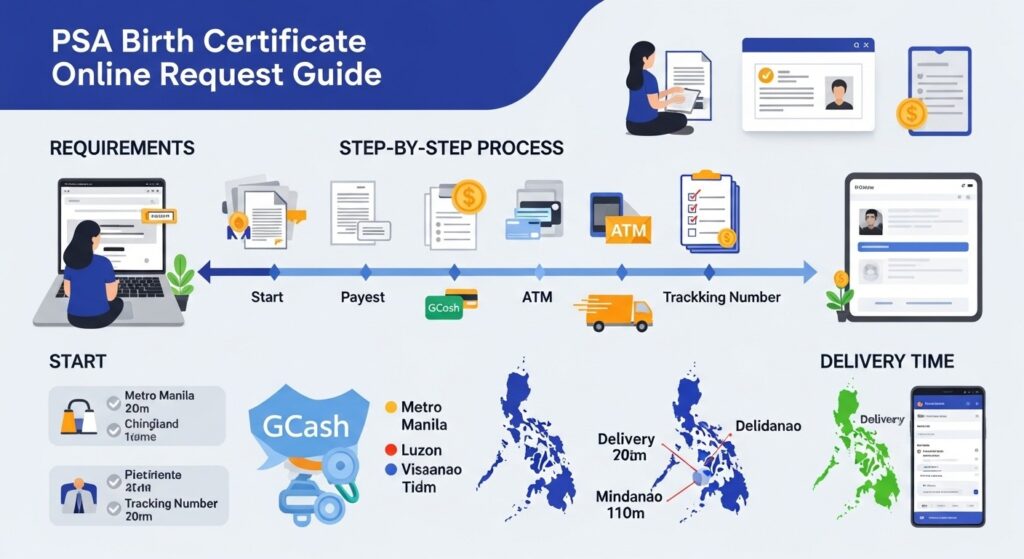
Step-by-step request process:
- Open the official PSA online portal. Look for the order button. Select “Birth” as the certificate type. Accept the terms and conditions. Choose whether the request is for oneself or someone else.
- Fill in the birth details. Type slowly. Double-check every letter. One typo breaks the search.
- Select the purpose of the request. Passport, school, employment, or other. The choice does not affect processing speed.
- Enter the delivery address. Include house number, street, barangay, city, province, and postal code. Missing any of these stops delivery.
- Choose delivery mode. Door-to-door brings the document to the address. Branch pick-up sends it to a partner store.
- Pay using GCash, credit card, or BancNet ATM. After payment, a 10-digit reference number appears on screen. Save it immediately. The same number arrives by email and SMS.
- Track the order using that number on the PSA tracking page.
Delivery Time by Location
Waiting time depends on where the document is going.
| Location | Typical Waiting Time |
| Metro Manila | Next business day |
| Luzon (provincial) | 3 to 5 working days |
| Visayas | 5 to 7 working days |
| Mindanao | 5 to 8 working days |
Remote areas sometimes take longer. Order ahead of any deadline.
What to Do When the Courier Arrives
The courier asks for two things before handing over the envelope.
- Valid government ID
- Signature on the delivery receipt
Check the envelope for damage before opening. Inside, the certificate is printed on security paper. Do not fold it. Do not laminate it. Store it flat in a safe place.
Part Two: Verifying the Certificate
Not every document claiming to be from PSA is real. Fake certificates exist. Knowing how to spot a real one protects against problems later. A genuine PSA birth certificate has several security features. Check each one.
Hologram.
Tilt the paper under light. A shiny PSA logo appears and moves. No hologram means fake.
Watermark.
Hold the paper up to light. A faint PSA seal shows through the paper. No watermark means fake.
QR Code.
Certificates issued from 2020 onward have a QR code. Scan it with a phone camera. The code links to the PSA verification portal. No QR code does not automatically mean fake. Older certificates do not have one. But for recent certificates, a missing QR code is a red flag.
Security Paper.
The paper feels different from regular copy paper. Slightly thicker. Slightly textured. Printing on regular paper means fake.
Serial Number.
A 12-digit number appears on the certificate. The format looks like 1234-5678-9012. This number is unique to each copy.
How to Verify Online Using the QR Code
The QR code is the fastest verification method.
Open the phone camera. Point it at the QR code on the certificate. A link appears. Tap the link. The PSA verification page opens.
The page shows whether the certificate is authentic and when it was issued.
If the QR code does not scan, type the serial number into the PSA verification portal manually.
How to Verify Without a QR Code
Older certificates do not have QR codes. Verify them using other methods.
Check the hologram and watermark. These are the most reliable features on older certificates.
Look at the issue date. PSA prints the date the certificate was requested. If the date is from before 2013, the certificate was issued under NSO. NSO certificates are still valid if authentic.
Call PSA support. Provide the serial number. Support staff can confirm if the certificate is genuine.
What to Do If the Certificate Fails Verification
A certificate that fails verification should not be used for any transaction.
Possible reasons for failure:
- The document is fake
- The QR code is damaged and cannot scan
- The serial number was entered wrong
- The certificate is too old and not in the online system
Next steps:
If the certificate is fake, report it. Do not use it. Request a new one through official channels.
If the QR code is damaged, request a new copy. The cost is the same as a regular request.
If the serial number was entered wrong, type it again carefully.
Common Request Mistakes That Lead to Problems
- Mistakes during the request process cause issues even before verification.
- Wrong name spelling. The system searches for a name that does not exist. No certificate arrives.
- Wrong birth date. Same problem. No match found.
- Incomplete address. The Courier cannot deliver. Document returns to PSA.
- Lost tracking number. No way to check the status or contact support efficiently.
- Double-check every field before submitting. Save the tracking number in multiple places.
How to Verify a Certificate Requested for Someone Else
The same verification rules apply. The certificate is not tied to the person who requested it. Only the person named on the document matters.
Check the name, birth date, and parents’ names against other official documents. Match everything. Any mismatch causes problems with passports, visas, or school enrollment.
What If the Record Cannot Be Found
Sometimes the online request returns “No Record Found.” That does not always mean the person has no birth record.
Possible reasons:
- The birth was never registered
- The LCRO never forwarded the record to PSA
- The name or date typed does not match the record
- The record is damaged or lost
What to do:
Do not reapply immediately. Contact the Local Civil Registry Office where the birth should have been registered. Ask them to check their records. If the record exists at LCRO but not at PSA, request them to forward it. Then, apply online again.
Frequently Asked Questions
Q1: How long does an online request take from start to delivery?
Fifteen minutes to fill out the form. Then 3 to 8 working days for delivery, depending on location.
Q2: Is the online certificate different from the walk-in?
No. Same security paper. Same holograms. Same QR code. No difference.
Q3: How to verify a certificate using just the serial number?
Go to the PSA verification portal. Enter the 12-digit serial number. The system shows if the certificate is authentic.
Q4: What if the QR code does not scan?
Type the serial number manually into the verification portal. Or request a new certificate with a clean QR code.
Q5: Can a fake PSA certificate be detected by looking at it?
Yes. Missing hologram. Missing watermark. Wrong paper. No QR code on recent certificates. These are signs of a fake.
Q6: Does PSA verify certificates over the phone?
Yes. Call PSA support with the serial number. They confirm authenticity.
Q7: How to know if a certificate is from NSO or PSA?
Check the issue date. Before 2013, NSO. After 2013, PSA. Both are valid. Many users still get confused about the differences between old and new records, especially when comparing a PSA vs NSO birth certificate for passport, visa, or school requirements.
Q8: What if the name on the certificate does not match other IDs?
Fix the birth record first. Request a correction at the Local Civil Registry Office. A mismatched name causes rejections.
Q9: Can a verified certificate still be rejected by an embassy?
Yes, if the embassy requires a recent issue date or an apostille. Verification confirms authenticity only. Other requirements still apply.
Q10: Is there a fee for verification?
No. Scanning the QR code is free. Using the online verification portal is free. Calling PSA support costs regular phone charges.
Final Summary
Requesting and verifying a PSA birth certificate online are two sides of the same process. The request must be accurate. The certificate must be real. Fill out the online form carefully. Type the name exactly as it appears on the birth record. Save the tracking number. Wait for delivery. When the certificate arrives, check the security features. Hologram. Watermark. QR code. Security paper. Serial number. Scan the QR code or enter the serial number into the PSA verification portal. A real certificate passes all checks. A fake one fails.