Intrusion Detection Systems: Types, Methods and Limits
Intrusion detection systems have one defining trait that most explanations bury: they notice trouble but they do not stop it. A tripwire does not lock the door and an IDS does not close a connection unless someone has set it up to act like something more than an IDS.
That single fact explains most of the confusion around the topic, from the IDS and IPS mix-up to the reason so many deployments quietly fail. This guide covers what these systems do, the two places a sensor can live, how detection works under the hood, what the technology cannot see since TLS 1.3 and which free tools are worth running.
It also separates the cyber meaning from the physical-security meaning, since search results for this phrase mix the two together and a fair share of readers land on the wrong one.
Intrusion Detection Systems in Plain English
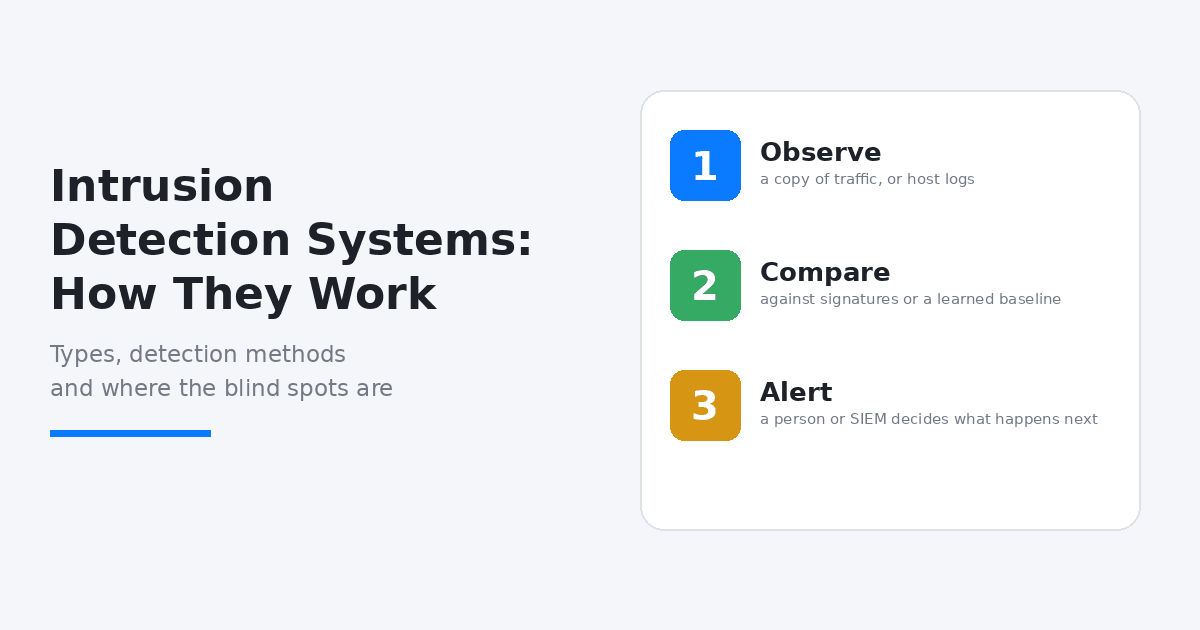
An intrusion detection system is software or a device that watches network traffic or activity on a computer for signs of malicious behavior or policy violations and raises an alert when it finds something. The whole job fits in three verbs: observe, compare and alert.
It observes a copy of the traffic or a host’s logs. It compares what it sees against known attack patterns or against a picture of what normal looks like. Then it alerts and a person or a security information and event management (SIEM) platform decides what happens next.
The closest everyday comparison is a smoke detector. It tells you there is a problem and it makes noise but it does not put the fire out. A sprinkler does that and in this analogy the sprinkler is an intrusion prevention system, covered further down.
These tools sit beside a firewall rather than replacing one. A firewall decides which connections are allowed in the first place, based on rules about addresses and ports. An IDS looks at what the permitted traffic is actually doing once it is inside.
The Other Meaning: Physical Intrusion Detection
Outside IT, intrusion detection systems means physical security: door contacts, motion sensors, glass-break detectors, fence vibration sensors and buried fiber-optic cables around the perimeter of an airport or a data center, all tied to an alarm panel. The word is the same and the industry is completely different.
Search results mix both. Pages from physical-security vendors sit right beside network-security explainers, which is why a reader looking for alarm hardware can end up reading about packet inspection and the reverse. If you came for perimeter sensors, add the word physical or perimeter to your search.
Everything from here on covers the cyber version. The two do meet in real life, though, since a data center usually runs both a network IDS and a physical one and each protects against a threat the other cannot see.
Network-Based vs Host-Based: Where the Sensor Lives
A network-based IDS (NIDS) sits at a chokepoint and inspects traffic passing through it. In most setups a switch mirror port, often called a SPAN port or a physical network TAP hands the sensor a copy of the traffic. One sensor can cover every machine on that segment but it cannot see inside encrypted payloads and it cannot see anything that happens on a host without touching the network.
A host-based IDS (HIDS) is an agent installed on the machine itself. It watches system logs, file integrity, running processes and configuration changes. It catches what a network sensor cannot, such as a modified system file or a local privilege escalation but it has to be installed and maintained on every host and a compromised host can tamper with its own agent.
Most mature environments run both, because they answer different questions. The network sensor asks what is moving between machines and the host agent asks what is happening on this one.
NIST’s Guide to Intrusion Detection and Prevention Systems (SP 800-94) recognizes four classes: network-based, wireless, network behavior analysis and host-based. Wireless systems watch Wi-Fi for rogue access points and attacks on wireless protocols. Network behavior analysis looks for unusual flows, such as the traffic pattern of a denial-of-service attack or malware spreading, rather than matching known signatures.
One caveat on that source: the guide dates from February 2007 and a draft revision published in 2012 was retired without being finalized. The four-class vocabulary is still the shared language of the field but the guide predates the encrypted-traffic problem covered below.
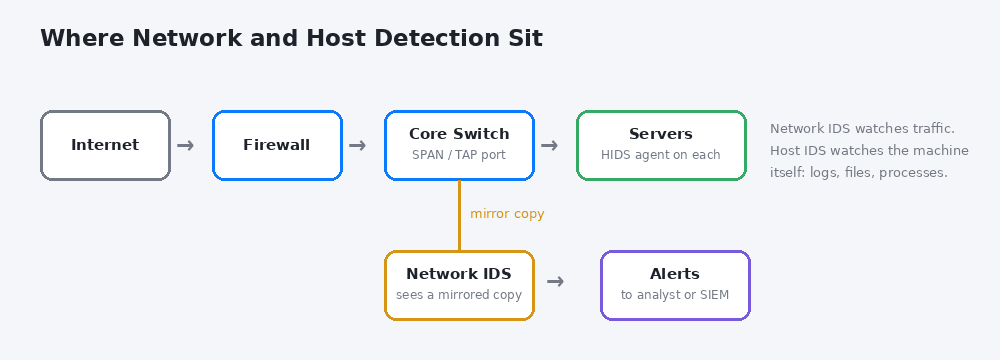
A network sensor sees a mirrored copy of traffic, while host agents watch each server directly.
How Detection Actually Works
Three detection methods do most of the work and real products blend them.
Signature-based detection matches traffic or files against patterns of known attacks: a byte sequence, an exploit string, a file hash. It is fast and precise for threats it knows about and it produces few false alarms. Its weakness is the mirror image of its strength, because a brand-new attack has no signature yet and the rules need constant updating.
Anomaly-based detection builds a baseline of normal behavior, such as typical traffic volume, usual login times and the protocols a server normally speaks and flags deviations. It can catch behavior nobody has written a rule for. The cost is noise: a new backup job or a busy quarter-end looks unusual to a baseline, so false positives are the main price of this approach.
Stateful protocol analysis compares observed behavior with what a protocol is supposed to do. A session that issues commands before it has authenticated is suspicious even if no signature exists for it.
In Snort and Suricata the signature side takes the form of rules, short text lines that say when traffic matching certain conditions should raise an alert with a given message. That is why the quality and freshness of the rule set matters as much as the engine itself.
IDS vs IPS: One Watches, One Blocks
A passive IDS analyzes a copy of the traffic and alerts after the fact. An intrusion prevention system (IPS) sits inline, in the path of the traffic itself, so it can drop packets, reset a connection or block an address before the traffic arrives. Vendors often sell the two together as IDPS.
Each mode has a cost. Inline blocking means a false positive interrupts legitimate traffic and an IPS that fails can break connectivity for everyone behind it. Passive monitoring risks nothing on that front but the response comes later.
Snort and Suricata can run in either mode. A common approach is to start passive, tune the rules against real traffic and move only the rule categories you trust into blocking.
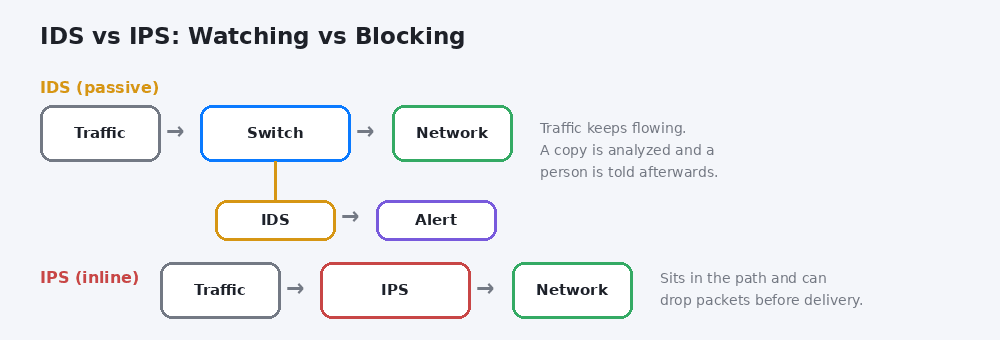
A passive IDS watches a copy and reports, while an inline IPS can stop traffic before it is delivered.
What These Systems Cannot See
Encrypted traffic is the biggest blind spot and it has grown. A network sensor cannot read the contents of an encrypted session. For years many enterprises worked around that by giving sensors a copy of a server’s private key so they could decrypt TLS 1.2 traffic passively.
TLS 1.3 breaks that trick. Its use of forward secrecy means past sessions stay protected even if a server is later compromised and NIST’s cybersecurity center notes that this approach may interfere with the passive decryption techniques enterprises rely on. NIST published SP 1800-37 on keeping visibility with TLS 1.3 to show workable alternatives and the practical options come down to inspecting at a proxy where the session is terminated, relying on metadata and leaning on host-based visibility.
The second blind spot is human. An untuned system can raise thousands of alerts a day and analysts learn to ignore a feed that is mostly noise. A detection that nobody reads is the same as no detection, so tuning out rules that do not apply to your environment is part of the job rather than an optional extra.
Placement matters too. A sensor at the internet edge sees nothing of traffic moving between internal machines, which is where an attacker spends time after getting in. Cloud networks need their own approach, either traffic mirroring supported by the provider or host agents, since you cannot plug a sensor into someone else’s switch. And signature-based detection will still miss a genuinely new attack until a rule exists.
Tools You Can Actually Run
Free and open-source options cover most small and mid-sized needs and they are what many commercial products are built around.
Snort is maintained by Cisco and its Talos team, with Snort 3 as the current major version. It ships with a free Community ruleset and a paid Subscriber ruleset that gets real-time updates from Talos.
Suricata is developed by the Open Information Security Foundation, a nonprofit, under the GPL version 2. It works as an IDS, an IPS and a network security monitoring engine and it can use many rules written in the Snort style.
Zeek, formerly called Bro, deserves a separate sentence because it is often listed beside Snort as though it did the same job. It is a passive network security monitor that produces rich structured logs of what happened on the network. Analysts use those logs for investigation and threat hunting more than for signature alerts and it pairs well with Suricata.
Wazuh covers the host side. It is an open-source platform combining XDR and SIEM functions, with agents that provide host-based intrusion detection, file integrity monitoring and log analysis. It grew out of the older OSSEC project.
A reasonable pairing for a small team is Suricata or Snort for the network and Wazuh for the hosts, with Zeek added when investigation matters. Commercial platforms bundle these ideas under names like network detection and response (NDR) and XDR.
Do Compliance Rules Require One
Often, in effect. PCI DSS version 4.0 requirement 11.5.1 calls for intrusion-detection and/or intrusion-prevention techniques to detect or prevent intrusions into the network. Earlier versions of the standard, where this sat under requirement 11.4, spelled out monitoring traffic at the perimeter of the cardholder data environment and at critical points inside it. Any organization that handles card payments should expect an assessor to ask about it.
The wording is about techniques, not a specific product and the and/or means detection alone can satisfy it. Other frameworks, ISO 27001 among them, ask for monitoring of activity on networks and systems without naming a tool. Check the exact wording that applies to you with your assessor rather than relying on a summary, including this one.
A Sensible Way to Start
If you are deploying one for the first time, this order avoids the usual mistakes.
- Map where traffic crosses trust boundaries: the internet edge, between user and server networks and the cloud edge.
- Start passive, with traffic mirrored to a single sensor at the most valuable chokepoint.
- Enable a reputable rule set, then disable the rules that fire constantly on harmless traffic in your environment.
- Send alerts somewhere a human actually reads, such as a ticket queue or SIEM and name an owner.
- Add host agents to the servers that matter most, then review monthly which rules produced real findings and which only produced noise.
FAQs
What are intrusion detection systems used for?
They monitor network traffic or host activity for signs of attacks and policy violations, then alert a person or a SIEM so the activity can be investigated.
Is an intrusion detection system the same as a firewall?
No. A firewall allows or blocks connections based on rules about addresses and ports, while an IDS inspects what permitted traffic is doing and raises alerts. They work well together.
Are intrusion detection systems only used on the exterior?
No. Sensors at the internet edge are common but internal sensors and host agents matter because attackers often move between internal machines after getting in.
Can an IDS stop an attack?
Not by itself. A passive IDS only alerts. Blocking requires an intrusion prevention system sitting inline or an automated response wired up to the alerts.
What is an example of an intrusion detection system?
Snort and Suricata are widely used network examples and Wazuh is a common open-source host-based option.
Can an IDS read HTTPS traffic?
Not without help. Encrypted sessions hide their contents from a network sensor, so inspection needs a decryption point such as a proxy or reliance on metadata and host-based visibility.
Do I still need one if I have antivirus?
Antivirus protects a single endpoint from known malicious files, while an IDS watches network and host behavior across many systems. They overlap a little and cover different gaps.
Conclusion
To sum up, intrusion detection systems observe, compare and alert and that is the extent of it until someone adds blocking, tuning and a person who reads the alerts. The technology is only as useful as its placement, its rules and the attention paid to what it reports and it has real blind spots in encrypted and internal traffic.
If you take one thing from this guide, start passive, tune hard and make sure every alert has an owner.
For something lighter after all that security reading, a few quick, no-signup tools live on BratGen’s homepage.