
Brat Font Text Generator—Create Charli XCX-Style Graphics Free
The Brat aesthetic from Charli XCX’s 2024 album went viral across social media, memes, and music platforms. Our free Brat Font Text Generator recreates that bold style instantly.
What Is a Brat Font Text Generator?
A Brat Font Text Generator is an online tool that creates bold, minimalist graphics inspired by Charli XCX’s iconic 2024 album cover style. You enter your text, and the tool instantly generates Brat-style images you can download and share. It also pairs well with tools like Invisible Text Copy Paste, a handy tool for generating invisible Unicode characters that work on Discord, TikTok, Instagram, Facebook, PUBG, Free Fire, Roblox, and many other apps, making it easy to create unique usernames, bios, messages, and stylish text.
The Brat aesthetic features simple lowercase text, bright neon backgrounds (usually green), and a signature blurred effect. This stripped-back design went viral across social media because it’s bold, eye-catching, and instantly recognizable. Many creators also use tools like Font Generator World to experiment with unique text styles that complement this aesthetic. Download and share on Instagram, TikTok, Twitter, or anywhere you want.
How to Use the Brat Font Text Generator
Creating Brat-style graphics takes less than a minute. Follow these simple steps.
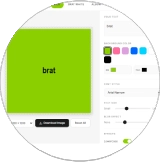
Enter Your Text
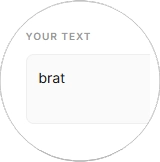
Add Text
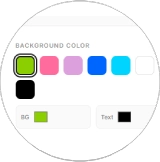
Choose Background Color
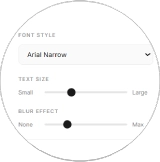
Adjust Font Style
Download Image
Open Tool
Add Text
Choose Colors
Adjust Style
Download Image
Enter Your Text
Type your message in the text input box. One or two words work great. The generator converts everything to lowercase automatically.
Choose Your Background Color
Pick your background color from the options. Classic Brat style uses neon green, but you can choose any color you want. Click the color you like or use the custom color picker for exact shades.
Select Text Color
Choose your text color to contrast with the background. Black text on green backgrounds is the iconic Brat look, but white, pink, or custom colors work too.
Adjust Blur Effect
Use the blur slider to control the background blur intensity. More blur creates the classic soft Brat aesthetic. Less blur keeps things sharp. Experiment until it looks right.
Preview Your Design
Check how your graphic looks in the preview area. Make any changes to text, colors, or blur settings. The preview updates instantly as you adjust.
Download Your Image
Click the download button when you're happy with your design. The image saves to your device as a high-quality file ready to share on social media.
Key Features of Brat Font Generator
Font generator tool includes everything you need to create perfect Brat-style graphics quickly and easily.
Instant Real-Time Preview
See your changes appear immediately as you type or adjust settings. No waiting, no delays. What you see on screen is exactly what you download.
Full Color Customization
Choose the iconic neon green that made Brat famous, or pick any color you like. Try hot pink, black, or white, or create custom shades.
Adjustable Blur Effect
Control the signature Brat blur with a simple slider. Add more blur for the classic soft aesthetic, or reduce it for sharper text. The tool keeps your text readable no matter what blur level you choose.
Multiple Export Sizes
Download your graphics in different sizes, perfect for any platform. Square images for Instagram posts, wide banners for Twitter headers, vertical formats for Stories - all formats maintain the Brat aesthetic.
High-Quality Downloads
Export images in sharp, high resolution (1200x1200 pixels). Your graphics look crisp on any screen, from phones to desktop monitors. No pixelation, no quality loss.
Works in Your Browser
No software downloads, no account creation, no email required. The tool runs completely in your browser. Your text stays private, and downloads happen directly to your device.
Completely Free
All features are free forever. No hidden costs, no watermarks, no premium tiers. Create unlimited Brat graphics without spending anything.
Authentic Brat Font Style
Get the real stretched, lowercase Brat typography automatically. The generator uses the same font style from Charli XCX's album - you don't need to install fonts or adjust settings manually.
Why Use a Brat Font Text Generator?
Creating Brat graphics in Photoshop or Canva takes 10-15 minutes and needs design skills. This tool creates them in seconds automatically. The “brat” style is trending on Instagram, TikTok, and Twitter right now. Using this aesthetic makes your content look current and gets more attention in crowded feeds. Bold colors and blur effects make people stop scrolling. Your posts stand out instead of getting ignored. The generator keeps every graphic consistent, so your profile looks professional. Millions use Brat graphics for memes and social posts. This tool connects you to that viral trend instantly.
Understanding the Brat Font Style
The Brat font style comes from Charli XCX’s album cover. It features lowercase text, neon green backgrounds, and a soft blur effect. The design looks intentionally simple and raw. This stripped-back aesthetic went viral because it breaks traditional design rules. No fancy graphics, no complex layouts—just bold text on bright colors. The style works perfectly for memes and social media because it grabs attention instantly.
What Our Users Say About the Brat Font Text Generator




Pro Tips to Create Perfect Brat Font Text
Avoid these common mistakes for better Brat-style graphics.
Keep Text Short—Use 1-5 words maximum. Long sentences look cluttered and lose impact.
Use Strong Contrast—Pick opposite colors. Black text on bright backgrounds or white text on dark backgrounds works best. Avoid similar shades.
Don’t Over-Blur—Too much blur makes text unreadable. Keep the light so people can read your message easily.
Stay Lowercase – The brat style is all lowercase. Uppercase letters break the aesthetic completely.
Check Your Preview—Always review before downloading. Small adjustments make big differences.
Choose the right size—pick the correct export size for your platform. Square for Instagram posts, vertical for Stories, wide for Twitter headers.
Experiment with Colors – Classic neon green works great, but try hot pink, black, or custom colors too.
These simple tips make your Brat graphics look professional and get more engagement.
Conclusion
The Brat Font Text Generator makes creating viral Brat-style graphics easy and fast. Type your text, customize colors, and download instantly. No design skills or software is needed—just your message and creativity. Start creating your Brat graphics now and join millions sharing this trending aesthetic across social media.
FAQs
Is the Brat Font Text Generator free to use?
Yes, completely free. Create unlimited Brat-style graphics without paying anything. No hidden costs, no watermarks, no premium plans.
Do I need to download any software?
No downloads needed. The tool works directly in your browser. Just open the page, create your graphics, and download your images.
Can I use Brat graphics commercially?
Yes, you can use your created graphics for personal or commercial purposes. Share them on social media, use them in marketing, or add them to your content freely.
Exploring Everything About Brat Generator
We all know that after the release of Charli XCX's album Brat, the internet is obsessed with it. The bold and distorted visual style text attracts every reader within seconds.
The Brat generator will help you create iconic style texts. Just like the real Brat album, these texts will also be in the same rebellious, stretched, and chaotic style.
With the Brat text aesthetic generator, you can easily convert normal text into "wrong" neon-fueled aesthetics. So, you can use these texts easily on social media posts, covers, bios, memes, and in branding.
How Brat Generator Works?
The working of the Brat generator tool is easy and quick. It can turn any normal text into the bold and distorted Brat-style aesthetic.
Open the Brat Generator
First of all, you should search for and then open the Brat text generator tool online.
Enter Your Text
Once you open the Brat website, you should enter text, a lyric line, or a title in the input field.
Pick Background Colors
Next, select the font and background colors from the available options. You can choose from neon green, hot pink, black, and white.
Click on the Generate Button
This smart tool will create a custom cover for your album or social media post within seconds.
Download Image
After you are satisfied with the design, you should click on the "Download image" button.
Outstanding Features
Let's explore the amazing features of our creative tool for generating custom texts.
Easy to Use
Simple and intuitive interface. No graphic design experience needed.
Full Customization
Change font size, colors, backgrounds, themes, and dimensions.
Real-time Preview
See quality changes live and adjust as you want for Instagram.
Multiple Colors
Choose from classic Brat green, red, blue, white, and more.
Brat Text Generator Gallery
The Brat maker tool exactly matches the real Brat album with green hues and distorted text.
Why the Brat Aesthetic Went Viral
Millions of people use the Brat text generator to create outstanding designs.
Global Popularity
The Brat tool has gained popularity across the world due to its connections with the famous album.
Artistic Freedom
This amazing tool offers complete freedom to users to create new and stylish designs.
Community Voices
Join thousands of satisfied creators
"Brat Generator makes meme creation so much fun! The bold fonts and bright colors make my posts stand out."
John Wilson
Meme Creator
"As a music enthusiast, I used the Brat maker to create personalized album covers. It's quick, free, and perfect!"
Jennifer Admin
Music Enthusiast
"The Brat Summer aesthetic feature is amazing! It allowed me to craft covers and posts that captured the vibe."
Kelly Bringes
Music Blogger
"This tool is a lifesaver for social media influencers! I can create professional-looking Brat-style thumbnails."
Shams Berk
Influencer
"I use Brat font Generator for creating promotional images for my clients. The vibrant colors make it stand out!"
Berlin Atan
Designer
"I've tried many design tools, but Brat Generator is by far the easiest for creating eye-catching posts."
Luca Carter
Explorer
"Obsessed. Literally the only generator I use now."
Sarah J.
Creator
"Finally, a generator that actually gets the kerning right. 10/10."
Mike R.
Graphic Lead
"Used this for my entire finsta feed. The green is exact."
Chloe D.
User
"Chaos mode engaged. My design team hates me but I love it."
Alex P.
Art Director
"Simple. Trashy. Perfect. Exactly what I needed for the merch."
Sam K.
Seller
"Why type normally when you can look like a brat? Best tool ever."
Jordan T.
Fan
Common Questions
No. There is no limitation on using the Brat font maker tool.
The mirror effect of the tool will horizontally mirror your text to create a new artistic appearance.
The Brat Redactor generator tool will create Brat-style texts or images with a redacted or censored effect.
Here are some famous templates of Brat: Classic Brat text template, Brat confession template, Brat mood template.
Of course not! The Brat text generator tool is not the official product of Charli XCX. It is only a personal product.
Yes! You can easily share content created by the Brat tool on any social media platform.
Some famous alternative text customization tools are Textgenerator. Online, stylishtext, socialtexttool.